jxl 操作模板,自适应高度HssfCellStyle 自适应。

一:HSSFCellStyle

// 生成一个样式
HSSFCellStyle style = workbook.createCellStyle();
// 设置这些样式
style.setAlignment(HSSFCellStyle.ALIGN_CENTER);//水平居中 
style.setVerticalAlignment(HSSFCellStyle.VERTICAL_CENTER);//垂直居中

 // 背景色
style.setFillForegroundColor(HSSFColor.YELLOW.index);
style.setFillPattern(HSSFCellStyle.SOLID_FOREGROUND); 
style.setFillBackgroundColor(HSSFColor.YELLOW.index); 

// 设置边框
style.setBorderBottom(HSSFCellStyle.BORDER_THIN);
style.setBorderLeft(HSSFCellStyle.BORDER_THIN);
style.setBorderRight(HSSFCellStyle.BORDER_THIN);
style.setBorderTop(HSSFCellStyle.BORDER_THIN);  
// 自动换行  这种换行的样式是这样的:

095234_BXes_1052786.png
style.setWrapText(true);  

// 生成一个字体
HSSFFont font = workbook.createFont();
font.setFontHeightInPoints((short) 10);
font.setColor(HSSFColor.RED.index);
font.setBoldweight(HSSFFont.BOLDWEIGHT_BOLD);
font.setFontName("宋体");

// 把字体 应用到当前样式
style.setFont(font);

//style设置好后,为cell设置样式
cell.setCellStyle(style)//cell为已有的单元格

二:

  在Excel处理的过程中,可能有需要用到行高自适应的时候。
  下面贴出用POI实现Excel行高自适应的代码。
  该代码可以处理一行Excel按内容自适应高度。可以处理一行内的合并单元格。
  但是该代码不支持涉及多行合并单元的计算,以后有空再补上。多行合并单元格的高度获取比较容易,但是其高度自适应就比较麻烦了。
  上代码:

/**
     * 根据行内容重新计算行高
     * @param row
     */
    public static void calcAndSetRowHeigt(HSSFRow sourceRow) {
        //原行高
        short height = sourceRow.getHeight();
        //计算后的行高
        double maxHeight = height;
        for (int cellIndex = sourceRow.getFirstCellNum(); cellIndex <= sourceRow.getPhysicalNumberOfCells(); cellIndex++) {
            HSSFCell sourceCell = sourceRow.getCell(cellIndex);
            //单元格的内容
            String cellContent = getCellContentAsString(sourceCell);
            if(null == cellContent || "".equals(cellContent)){
                continue;
            }
            //单元格的宽度
            int columnWidth = getCellWidth(sourceCell);
            System.out.println("单元格的宽度 : " + columnWidth + "    单元格的高度 : " + maxHeight + ",    单元格的内容 : " + cellContent);
            HSSFCellStyle cellStyle = sourceCell.getCellStyle();
            HSSFFont font = cellStyle.getFont(sourceRow.getSheet().getWorkbook());
            //字体的高度
            short fontHeight = font.getFontHeight();
            
            //cell内容字符串总宽度
            double cellContentWidth = cellContent.getBytes().length * 2 * 256;
            
           //字符串需要的行数 不做四舍五入之类的操作
           double stringNeedsRows =(double)cellContentWidth / columnWidth;
           //小于一行补足一行
           if(stringNeedsRows < 1.0){
               stringNeedsRows = 1.0;
           }
           
           //需要的高度             (Math.floor(stringNeedsRows) - 1) * 40 为两行之间空白高度
           double stringNeedsHeight = (double)fontHeight * stringNeedsRows;
           if(stringNeedsHeight > maxHeight){
               maxHeight = stringNeedsHeight;
           }
           System.out.println("字体高度 : " + fontHeight + ",    字符串宽度 : " + cellContentWidth + ",    字符串需要的行数 : " + stringNeedsRows + ",   需要的高度 : " + stringNeedsHeight);
           System.out.println();
        }
        //超过原行高三倍 则为3倍 实际应用中可
        if(maxHeight/height > 5){
            maxHeight = 5 * height;
        }
        //最后取天花板防止高度不够
        maxHeight = Math.ceil(maxHeight);
        sourceRow.setHeight((short)maxHeight);
    }
    
    /**
     * 解析一个单元格得到数据
     * @param columnNameList
     * @param row
     * @param ext2
     * @param ext1
     * @return
     */
    private static String getCellContentAsString(HSSFCell cell) {
        if(null == cell){
            return "";
        }
        String result = "";
        switch (cell.getCellType()) {
        case Cell.CELL_TYPE_NUMERIC:
            String s = String.valueOf(cell.getNumericCellValue());
            if (s != null) {
                if (s.endsWith(".0")) {
                    s = s.substring(0, s.length() - 2);
                }
            }
            result = s;
            break;
        case Cell.CELL_TYPE_STRING:
            result = ToolKits.nulltoempty(String.valueOf(cell.getStringCellValue())).trim();
            break;
        case Cell.CELL_TYPE_BLANK:
            break;
        case Cell.CELL_TYPE_BOOLEAN:
            result = String.valueOf(cell.getBooleanCellValue());
            break;
        case Cell.CELL_TYPE_ERROR:
            break;
        default:
            break;
        }
        return result;
    }
    
    /**
    * 获取单元格及合并单元格的宽度
    * @param sheet
    * @param row
    * @param column
    * @return
    */
    private static int getCellWidth(HSSFCell cell) {
        int result = 0;
        HSSFSheet sheet = cell.getSheet();
        int rowIndex = cell.getRowIndex();
        int columnIndex = cell.getColumnIndex();
        
        boolean isPartOfRegion = false;
        int firstColumn = 0;
        int lastColumn = 0;
        int firstRow = 0;
        int lastRow = 0;
        int sheetMergeCount = sheet.getNumMergedRegions();
        for (int i = 0; i < sheetMergeCount; i++) {
            Region ca = sheet.getMergedRegionAt(i);
            firstColumn = ca.getColumnFrom();
            lastColumn = ca.getColumnTo();
            firstRow = ca.getRowFrom();
            lastRow = ca.getRowTo();
            if (rowIndex >= firstRow && rowIndex <= lastRow) {
                if (columnIndex >= firstColumn && columnIndex <= lastColumn) {
                    isPartOfRegion = true;
                    break;
                }
            }
        }
        if(isPartOfRegion){
            for (int i = firstColumn; i <= lastColumn; i++) {
                result += sheet.getColumnWidth(i);
            }
        }else{
            result = sheet.getColumnWidth(columnIndex);
        }
        return result;
    }

经过上面的方法计算,这种更符合我的需求,貌似格式也没有损坏:

095353_wYwb_1052786.png

转载于:https://my.oschina.net/u/1052786/blog/909542

来源:https://my.oschina.net/u/1052786/blog/909542


智能推荐

webView内容高度,自适应高度

实现思路: webView加载H5链接,设置它为tableView的headerView,下方评论信息用Cell加载展示。 在webView的回调方法webViewDidFinishLoad中获取网页内容高度,设置为webView的高度,重新将webView赋给tableView的headerView。 Tip:将一个View赋值给UITableView的tableHeaderView时,不需要手...

上盒子固定 下面自适应高度

<style> html, body { height: 100%; padding: 0; margin: 0; } .outer { height: 100%; position: relative; } .A { height: 100px; background: #BBE8F2; } .B { background: #D9C666; width: 100%; positio...

小程序swiper(tab)高度自适应

swiper高度问题一直困扰我。今天终于有时间来解决一下。因为他的高度不能固定死,写死其他数据展示不完全,不写或者100%,auto都不行。翻了一堆资料也查了很多,最后总结一下。 1.很多人都说用一种方法。就是高度*数量,也就是所说的获取数据数组长度,根据数据长度来动态改变每页的长度,因为字号啊什么的在各个手机显示不一定都相同,总感觉不是解决问题的最佳方法。 2.使用Swiper+scroll-v...

css解决高度自适应问题

转自:https://www.cnblogs.com/zhujl/archive/2012/03/20/2408976.html css解决高度自适应问题 高度自适应问题,我很抵触用js去解决,因为不好维护,也不够自然,但是纯用CSS,难度不小,比如下面我要说的例子。 需求: 这个矩形的高度和浏览器窗口的高度相同,不能出现纵向滚动条; 绿色部分高度固定,比如50px; 紫色部分填充剩余的高度; h...

原型对象,原型链

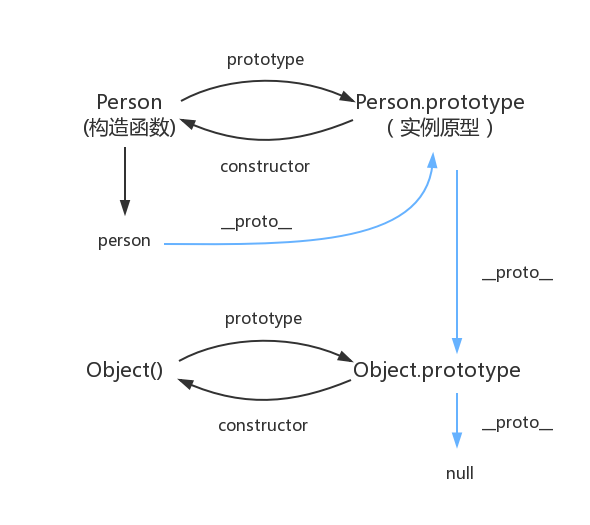
函数都有prototype属性,它指向原型对象。 实例对象有__proto__属性,它指向对象原型 每一个原型对象都有constructor输赢,指向构造函数,每一个原型对象又具有__proto__属性,这个指向Object.prototype.在这里插入图片描述...

猜你喜欢

Node 调用 dubbo 服务的探索及实践

2.Dubbo简介 2.1 什么是dubbo Dubbo是一款高性能、轻量级的开源Java RPC框架,它提供了三大核心能力:面向接口的远程方法调用,智能容错和负载均衡,以及服务自动注册和发现。 2.2 流程图 Provider : 暴露服务的服务提供方。 Consumer : 调用远程服务的服务消费方。 Registry : 服务注册与发现的注册中心。 Monito...

mysql总结

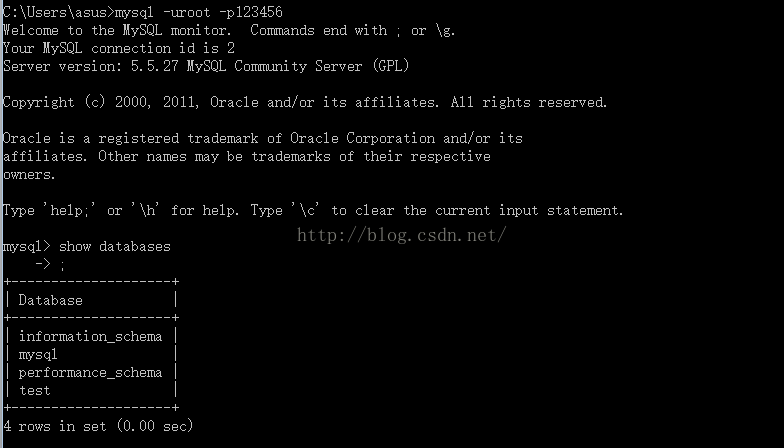
mysql基础入门的总结     关于数据库:     数据库是软件开发人员要掌握的基本工具,软件的运行的过程就是操作数据的过程,数据库中的数据无非就是几个操作:增-删-查-改。         Mysql安装完成后,需要配置变量环境,找到配置路径path,然后把mysql安装目录bin文件导入就可以了。 然后运行cm...

adb及monkey常用命令

adb常用命令: 查看手机是否连接:adb devices   连接设备:adb connect 设备ip:端口号  若有连接多个设备需指明设备ip及端口号 安装APP:adb install [-r] 包名  -r表示覆盖安装,首次安装可省略 卸载APP:adb uninstall 包名 列出设备中所有应用包名:adb shell pm list packages ...

PC端浏览器如何设置无图模式

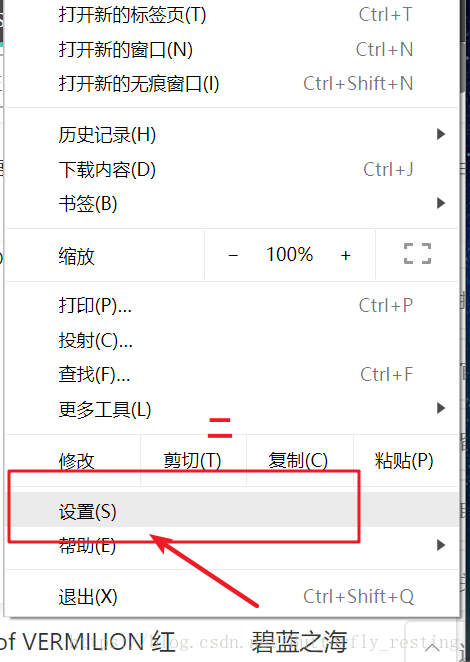
以谷歌浏览器为例,注意有些浏览器并不支持该功能。 1)打开自定义与控制 2)选择设置 3)查看左边状态栏,选择高级设置--》隐私设置和安全性 4)选择内容设置 5)图片 6)选择不显示任何图片,其中也可以只禁用某些网站图片,或者只开启自己想显示图片的网站...

2021-06-08

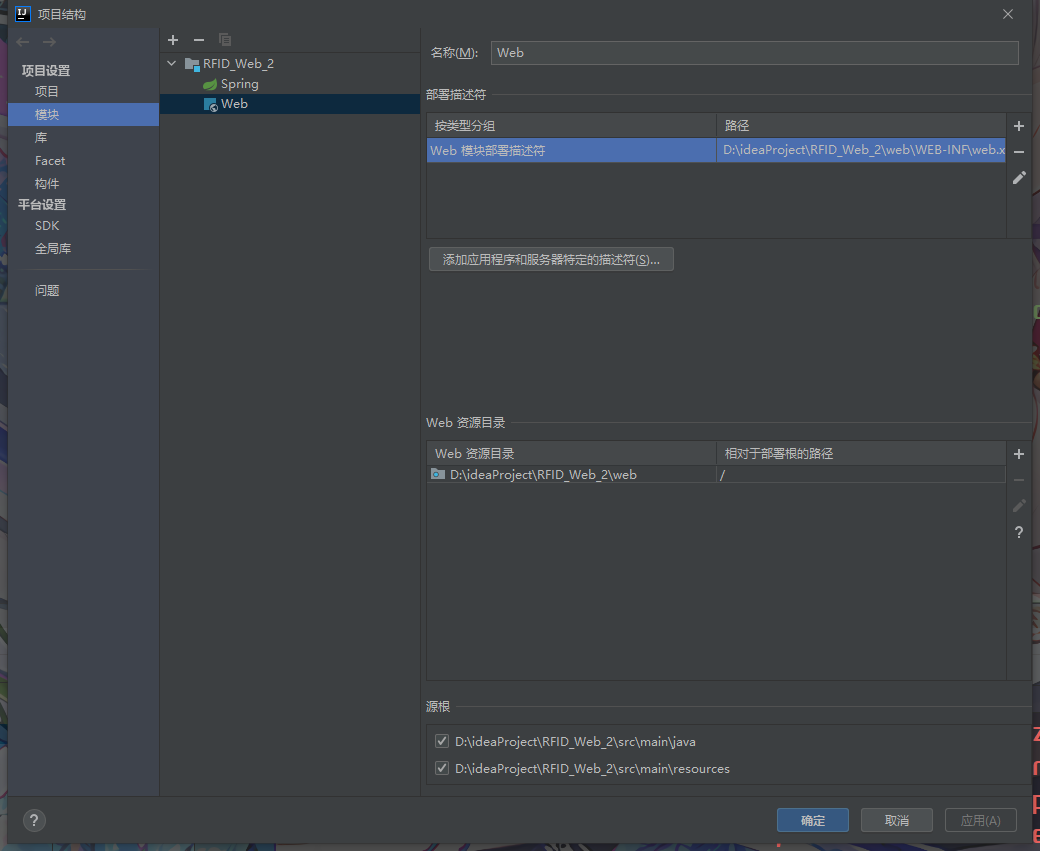
IDEA中使用springMVC 出现 404请求的资源不可用的其他一个可能原因 如果你确认你在视图解析器中的路径设置没有问题,各种文件名都没问题,却依然出现资源不可用错误 你可以检查这个页面中是否为web部署了工件,没有的话部署一下就好了。...

问答精选

Correctly formatting GCM notifications?

I'm currently trying out the google cloud messaging service with its sample application "Guestbook." https://developers.google.com/cloud/samples/mbs/ I'm attempting to send notifications tha...

Are there any performance benefits of using Asynchronous functions over Synchronous in Node Js?

Now I came across an article that distinguishes between an Asynchronous function and Synchronous functions. From my understanding of the different examples and explanations, synchronous functions are ...

Python: Costing calculator output

Good day all I'm busy creating a small costing calculator for the signage department. I'm not getting the calculator to output the amount. Brief Description: You enter the height and width and then wh...

Flask-SQLAlchemy - model has no attribute 'foreign_keys'

I have 3 models created with Flask-SQLalchemy: User, Role, UserRole role.py: user.py: user_role.py: If I try (in the console) to get all users via User.query.all() I get AttributeError: 'NoneType' obj...

Seeding many PRNGs, then having to seed them again, what is a good quality approach?

I have many particles that follow an stochastic process in parallel. For each particle, there is a PRNG associated to it. The simulation must go through many repetitions to get average results. For ea...

相关问题

相关文章

热门文章

推荐文章

相关标签

推荐问答