swagger使用指南
前言:作为一个以前后端分离为模式开发小组,我们每隔一段时间都进行这样一个场景:前端人员和后端开发在一起热烈的讨论"哎,你这参数又变了啊","接口怎么又请求不通了啊","你再试试,我打个断点调试一下.."。可以看到在前后端沟通中出现了不少问题。
对于这样的问题,之前一直没有很好的解决方案,直到它的出现,没错...这就是我们今天要讨论的神器:swagger,一款致力于解决接口规范化、标准化、文档化的开源库,一款真正的开发神器。
目录
swagger是什么?
为什么要使用swaager?
如何搭一个swagger?
如何在项目中集成swagger
使用swagger需要注意的问题
总结
一:swagger是什么?
Swagger是一款RESTFUL接口的文档在线自动生成+功能测试功能软件。Swagger是一个规范和完整的框架,用于生成、描述、调用和可视化RESTful风格的Web服务。目标是使客户端和文件系统作为服务器以同样的速度来更新文件的方法,参数和模型紧密集成到服务器。
这个解释简单点来讲就是说,swagger是一款可以根据resutful风格生成的生成的接口开发文档,并且支持做测试的一款中间软件。
二:为什么要使用swaager?
2.1:对于后端开发人员来说
不用再手写WiKi接口拼大量的参数,避免手写错误
对代码侵入性低,采用全注解的方式,开发简单
方法参数名修改、增加、减少参数都可以直接生效,不用手动维护
缺点:增加了开发成本,写接口还得再写一套参数配置
2.2:对于前端开发来说
后端只需要定义好接口,会自动生成文档,接口功能、参数一目了然
联调方便,如果出问题,直接测试接口,实时检查参数和返回值,就可以快速定位是前端还是后端的问题
2.3:对于测试
对于某些没有前端界面UI的功能,可以用它来测试接口
操作简单,不用了解具体代码就可以操作
操作简单,不用了解具体代码就可以操作
三:如何搭一个swagger
3.1:引入swagger的依赖
目前推荐使用2.7.0版本,因为2.6.0版本有bug,而其他版本又没有经过验证<!--引入swa
gger-->

<dependency>

   <groupId>io.springfox</groupId>

   <artifactId>springfox-swagger2</artifactId>

   <version>2.7.0</version>

</dependency>

<dependency>

   <groupId>io.springfox</groupId>

   <artifactId>springfox-swagger-ui</artifactId>

   <version>2.7.0</version>

</dependency>
3.2:springBoot整合swagger@Configur
ation

@EnableSwagger2

public class SwaggerConfig {

   @Bean

   public Docket productApi() {

       return new Docket(DocumentationType.SWAGGER_2)

               .apiInfo(apiInfo())

               .select()

               .apis(RequestHandlerSelectors.withMethodAnnotation(ApiOperation.class))  //添加ApiOperiation注解的被扫描

               .paths(PathSelectors.any())

               .build();

   }

   private ApiInfo apiInfo() {

       return new ApiInfoBuilder().title(”swagger和springBoot整合“).description(”swagger的API文档")

               .version("1.0").build();

   }

}
3.3:swagger的注解
swagger的核心在于注解,接下来就着重讲一下swagger的注解:
四:在项目中集成swagger
4.1:在controller中使用注解
package com.youjia.swagger.controller;

import com.youjia.swagger.constants.CommonConstants;

import com.youjia.swagger.model.Film;

import com.youjia.swagger.model.ResultModel;

import com.youjia.swagger.service.FilmService;

import io.swagger.annotations.Api;

import io.swagger.annotations.ApiImplicitParam;

import io.swagger.annotations.ApiImplicitParams;

import io.swagger.annotations.ApiOperation;

import io.swagger.annotations.ApiParam;

import io.swagger.annotations.ApiResponse;

import io.swagger.annotations.ApiResponses;

import org.springframework.beans.factory.annotation.Autowired;

import org.springframework.util.CollectionUtils;

import org.springframework.util.StringUtils;

import org.springframework.web.bind.annotation.GetMapping;

import org.springframework.web.bind.annotation.PathVariable;

import org.springframework.web.bind.annotation.PostMapping;

import org.springframework.web.bind.annotation.RequestBody;

import org.springframework.web.bind.annotation.RequestMapping;

import org.springframework.web.bind.annotation.RequestParam;

import org.springframework.web.bind.annotation.RestController;

import javax.servlet.http.HttpServletRequest;

import java.text.DateFormat;

import java.text.SimpleDateFormat;

import java.util.Date;

import java.util.List;

import java.util.Objects;

/**

* @Auther: wyq

* @Date: 2018/12/29 14:50

*/

@RestController

@Api(value = "电影Controller", tags = { "电影访问接口" })

@RequestMapping("/film")

public class FilmController {

   @Autowired

   private FilmService filmService;

   /**

    * 添加一个电影数据

    *

    * @param

    * @return

    */

   @ApiOperation(value = "添加一部电影")

   @PostMapping("/addFilm")

   @ApiResponses(value = { @ApiResponse(code = 1000, message = "成功"), @ApiResponse(code = 1001, message = "失败"),

           @ApiResponse(code = 1002, response = Film.class,message = "缺少参数") })

   public ResultModel addFilm(@ApiParam("电影名称") @RequestParam("filmName") String filmName,

                              @ApiParam(value = "分数", allowEmptyValue = true) @RequestParam("score") Short score,

                              @ApiParam("发布时间") @RequestParam(value = "publishTime",required = false) String publishTime,

                              @ApiParam("创建者id") @RequestParam("creatorId") Long creatorId) {

       if (Objects.isNull(filmName) || Objects.isNull(score) || Objects.isNull(publishTime) || StringUtils

               .isEmpty(creatorId)) {

           return new ResultModel(ResultModel.failed, "参数错误");

       }

       Film filmPOM = new Film();

       filmPOM.setFilmName(filmName);

       filmPOM.setScore(score);

       DateFormat simpleDateFormat = new SimpleDateFormat("yyyy-MM-dd");

       Date publishTimeDate = null;

       try {

           publishTimeDate = simpleDateFormat.parse(publishTime);

       } catch (Exception ex) {

           ex.printStackTrace();

       }

       filmPOM.setPublishTime(publishTimeDate);

       filmPOM.setCreatorId(creatorId);

       Boolean result = filmService.addFilm(filmPOM);

       if (result) {

           return new ResultModel(CommonConstants.SUCCESSMSG);

       }

       return new ResultModel(CommonConstants.FAILD_MSG);

   }

   /**

    * 根据电影名字获取电影

    *

    * @param fileName

    * @return

    */

   @GetMapping("/getFilms")

   @ApiOperation(value = "根据名字获取电影")

   @ApiResponses(value = { @ApiResponse(code = 1000, message = "成功"), @ApiResponse(code = 1001, message = "失败"),

           @ApiResponse(code = 1002, message = "缺少参数") })

   public ResultModel getFilmsByName(@ApiParam("电影名称") @RequestParam("fileName") String fileName) {

       if (StringUtils.isEmpty(fileName)) {

           return CommonConstants.getErrorResultModel();

       }

       List<Film> films = filmService.getFilmByName(fileName);

       if (!CollectionUtils.isEmpty(films)) {

           return new ResultModel(films);

       }

       return CommonConstants.getErrorResultModel();

   }

   /**

    * 根据电影名更新

    *

    * @return

    */

   @PostMapping("/updateScore")

   @ApiOperation(value = "根据电影名修改分数")

   @ApiResponses(value = { @ApiResponse(code = 1000, message = "成功"), @ApiResponse(code = 1001, message = "失败"),

           @ApiResponse(code = 1002, message = "缺少参数") })

   public ResultModel updateFilmScore(@ApiParam("电影名称") @RequestParam("fileName") String fileName,

                                      @ApiParam("分数") @RequestParam("score") Short score) {

       if (StringUtils.isEmpty(fileName) || Objects.isNull(score)) {

           return CommonConstants.getErrorResultModel();

       }

       filmService.updateScoreByName(fileName, score);

       return CommonConstants.getSuccessResultModel();

   }

   /**

    * 根据电影名删除电影

    *

    * @param request

    * @return

    */

   @PostMapping("/delFilm")

   @ApiOperation(value = "根据电影名删除电影")

   @ApiImplicitParams({ @ApiImplicitParam(name = "filmName",

           value = "电影名",

           dataType = "String",

           paramType = "query",

           required = true), @ApiImplicitParam(name = "id", value = "电影id", dataType = "int", paramType = "query") })

   public ResultModel deleteFilmByNameOrId(HttpServletRequest request) {

       //电影名

       String filmName = request.getParameter("filmName");

       //电影id

       Long filmId = Long.parseLong(request.getParameter("id"));

       filmService.deleteFilmOrId(filmName,filmId);

       return CommonConstants.getSuccessResultModel();

   }

   /**

    * 根据id获取电影

    *

    * @param id

    * @return

    */

   @PostMapping("/{id}")

   @ApiOperation("根据id获取电影")

   @ApiImplicitParam(name = "id", value = "电影id", dataType = "long", paramType = "path", required = true)

   public ResultModel getFilmById(@PathVariable Long id) {

       if (Objects.isNull(id)) {

           return CommonConstants.getLessParamResultModel();

       }

       Film film = filmService.getFilmById(id);

       if (Objects.nonNull(film)) {

           return new ResultModel(film);

       }

       return CommonConstants.getErrorResultModel();

   }

   /**

    * 修改整个电影

    *

    * @param film

    * @return

    */

   @PostMapping("/insertFilm")

   @ApiOperation("插入一部电影")

   public ResultModel insertFilm(@ApiParam("电影实体对象") @RequestBody Film film) {

       if (Objects.isNull(film)) {

           return CommonConstants.getLessParamResultModel();

       }

       Boolean isSuccess = filmService.insertFilm(film);

       if (isSuccess) {

           return CommonConstants.getSuccessResultModel();

       }

       return CommonConstants.getErrorResultModel();

   }

}
4.2:访问本地链接
http://localhost:8080/swagger-ui.html#/
可以看出访问的url都很清晰的展示在它最终的页面上,我们打开一个方法:可以看出方法的请求参数清晰的的罗列出来,包括方法的返回值。并且有一个很重要的功能,只需要点下方的try it out就可以进行接口测试,
五:使用swagger需要注意的问题
对于只有一个HttpServletRequest参数的方法,如果参数小于5个,推荐使用 @ApiImplicitParams的方式单独封装每一个参数;如果参数大于5个,采用定义一个对象去封装所有参数的属性,然后使用@APiParam的方式
默认的访问地址:ip:port/swagger-ui.html#/,但是在shiro中,会拦截所有的请求,必须加上默认访问路径(比如项目中,就是ip:port/context/swagger-ui.html#/),然后登陆后才可以看到
在GET请求中,参数在Body体里面,不能使用@RequestBody。在POST请求,可以使用@RequestBody和@RequestParam,如果使用@RequestBody,对于参数转化的配置必须统一
controller必须指定请求类型,否则swagger会把所有的类型(6种)都生成出来
swagger在生产环境不能对外暴露,可以使用@Profile({“dev”, “prod”,“pre”})指定可以使用的环境
六:总结
swagger作为一款辅助性的工具,能大大提升我们的和前端的沟通效率,接口是一个非常重要的传递数据的媒介,每个接口的签名、方法参数都非常重要。一个良好的文档非常重要,如果采用手写的方式非常容易拼写错误,而swagger可以自动化生成参数文档,这一切都加快了我们的沟通效率。并且可以替代postman的作用。实在是开发编程必备良品啊。
扩展阅读
来源:https://www.cnblogs.com/wyq178/p/10291447.html
微信公众号:javafirst
扫码关注免费获取更多资源

来源:网络
智能推荐

JBOSS使用指南
JBOSS使用指南 一.JBOSS入门 2 1.下载和安装JBoss 2.JBoss的目录结构 3.启动服务器 3 4.JMX控制台 4 5.停止服务器 5 6.JBoss中的部署 5 二.JBOSS的配置 1. JBoss日志设置 2. web 服务的端口号的修改 3. JBoss 的安全设置 3.1 jmx-console 登录的用户名和密码设置 7 3.2...

github使用指南
是什么,为什么,怎么做是考试政治解答题的一种经典套路。今天就按照这个套路来搞一波 GitHub是什么 说道GitHub程序员一定不陌生,它不就是这样的吗? 简单来说Git 是一个管理你的代码的历史记录的工具。 为啥要用GitHub 1.同步代码到云端,可以防止代码的丢失以及和别人分享自己的工作。 怎么用 1.创建新项目 respositories顾名思义就是一个代码储存的仓库 创建一个代码的仓库就...

Lombok使用指南
Lombok使用分享 一个例子 在面向对象编程中必不可少需要在代码中定义对象模型,而在基于Java的业务平台开发实践中尤其如此。相信大家在平时开发中也深有感触,本来是没有多少代码开发量的,但是因为定义的业务模型对象比较多,而需要重复Getter/Setter、构造器方法、字符串输出的ToString方法和Equals/HashCode方法等。那么是否一款插件或工具能够替大家完成这些繁琐的操作呢? ...
TortoiseGit 使用指南
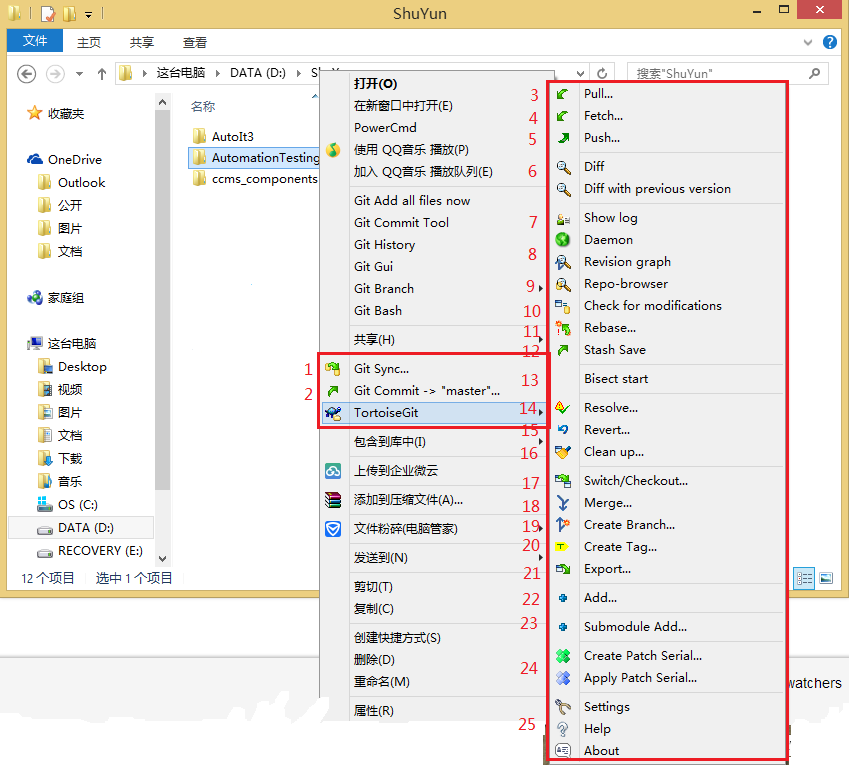
TortoiseGit菜单概览: p.s. 安装TortoiseGit后,请先按照TortoiseGit**设置教程完成SSH**配置 下面逐一讲解以上菜单: Git同步菜单,主要用来跟服务器进行同步操作(pull/push); 也可以在该窗口进行commit或查看log等操作; Git提交工菜单,当有文件被改动时,在被改动文件(或者其上层目录)上右键选择此菜单,会弹出提交窗口,如下图:填写信息,...

Linkerd 使用指南
前言 该文章已归档到 kubernetes-handbook 第五章【领域应用】中,一切内容以 kubernetes-handbook 为准,该文档可能不会及时更新。 以下内容参考:A Service Mesh for Kubernetes Linkerd 作为一款 service mesh 与kubernetes 结合后主要有以下几种用法: 作为服务网关,可以监控 kubernetes 中的服务...
猜你喜欢
原型对象,原型链
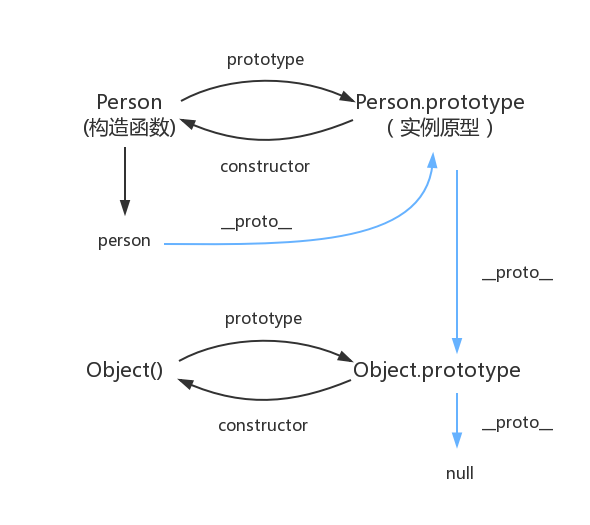
函数都有prototype属性,它指向原型对象。 实例对象有__proto__属性,它指向对象原型 每一个原型对象都有constructor输赢,指向构造函数,每一个原型对象又具有__proto__属性,这个指向Object.prototype.在这里插入图片描述...

Node 调用 dubbo 服务的探索及实践
2.Dubbo简介 2.1 什么是dubbo Dubbo是一款高性能、轻量级的开源Java RPC框架,它提供了三大核心能力:面向接口的远程方法调用,智能容错和负载均衡,以及服务自动注册和发现。 2.2 流程图 Provider : 暴露服务的服务提供方。 Consumer : 调用远程服务的服务消费方。 Registry : 服务注册与发现的注册中心。 Monito...
mysql总结
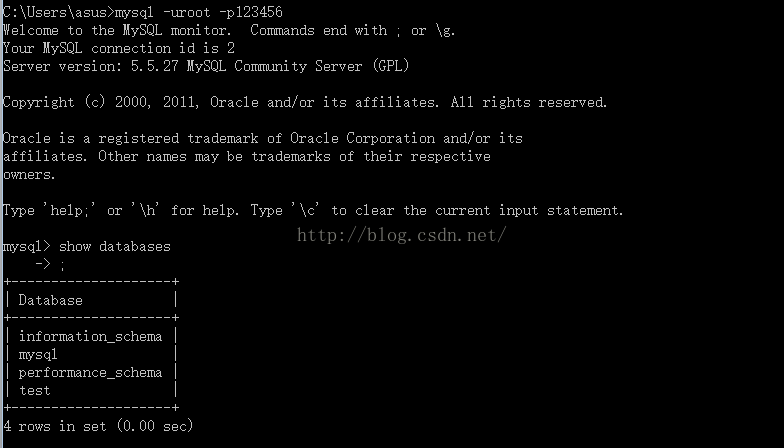
mysql基础入门的总结 关于数据库: 数据库是软件开发人员要掌握的基本工具,软件的运行的过程就是操作数据的过程,数据库中的数据无非就是几个操作:增-删-查-改。 Mysql安装完成后,需要配置变量环境,找到配置路径path,然后把mysql安装目录bin文件导入就可以了。 然后运行cm...
adb及monkey常用命令
adb常用命令: 查看手机是否连接:adb devices 连接设备:adb connect 设备ip:端口号 若有连接多个设备需指明设备ip及端口号 安装APP:adb install [-r] 包名 -r表示覆盖安装,首次安装可省略 卸载APP:adb uninstall 包名 列出设备中所有应用包名:adb shell pm list packages ...
PC端浏览器如何设置无图模式
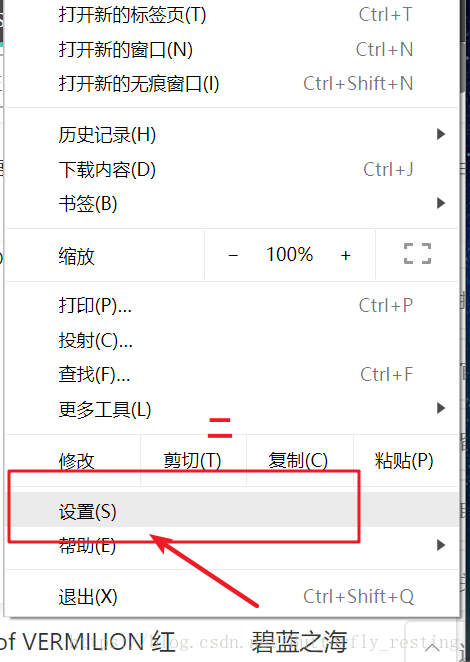
以谷歌浏览器为例,注意有些浏览器并不支持该功能。 1)打开自定义与控制 2)选择设置 3)查看左边状态栏,选择高级设置--》隐私设置和安全性 4)选择内容设置 5)图片 6)选择不显示任何图片,其中也可以只禁用某些网站图片,或者只开启自己想显示图片的网站...
问答精选
Correctly formatting GCM notifications?
I'm currently trying out the google cloud messaging service with its sample application "Guestbook." https://developers.google.com/cloud/samples/mbs/ I'm attempting to send notifications tha...
Are there any performance benefits of using Asynchronous functions over Synchronous in Node Js?
Now I came across an article that distinguishes between an Asynchronous function and Synchronous functions. From my understanding of the different examples and explanations, synchronous functions are ...
Python: Costing calculator output
Good day all I'm busy creating a small costing calculator for the signage department. I'm not getting the calculator to output the amount. Brief Description: You enter the height and width and then wh...
Flask-SQLAlchemy - model has no attribute 'foreign_keys'
I have 3 models created with Flask-SQLalchemy: User, Role, UserRole role.py: user.py: user_role.py: If I try (in the console) to get all users via User.query.all() I get AttributeError: 'NoneType' obj...
Seeding many PRNGs, then having to seed them again, what is a good quality approach?
I have many particles that follow an stochastic process in parallel. For each particle, there is a PRNG associated to it. The simulation must go through many repetitions to get average results. For ea...
相关问题
相关文章
热门文章
推荐文章
相关标签
推荐问答
- ShareActionProvider with background processing
- gridview changing position automatically when notifiedDatasetChangedCalled?
- How to efficiently fill-in a structure with vectors?
- when i exit from node js, i just cant give command in my terminal
- How to upload an image with Spray?
- Edit my message before posting in Twitter with Twitter API and PHP
- Using css style selector in JQuery not working?
- Can Html.Display/Html.DisplayFor/Html.DisplayForModel work with a DataTable?
- What does <?!= mean in Google Apps Script?
- Python/Linux - Manually installing httplib2 as a non-root user