vi for beginner

1.open terminal

2.type "vi" <enter>
if you want to exit, type ":q!"

3.type "cd /etc", which means go to the directory of the etc
type "cd", it will return to root directory.
type "vi /etc/fstab", which means you edit the file.
type "vi xx.txt", if the xx.txt is not exit, then the file is new.

4.when you type "vi", you are in the Command Mode.
if you want to translate to the Inserting Mode, you can type "i".
now, you can input some content, if you want to exit without save, translate to Command Mode, then type ":q!"
if you want to save and exit, you must type ":wq"
if you want to save as other file name, you can type ":w filename"

5. open a file including many lines, type "vi /var/log/syslog"
if you want to find some charactors, type "/charactors". then you can find the first position where the charactors are.
If you want to go on find the charactors, type "n", then you will find the next one.
If you type "N", you will find the previous charactors.
by the way, if you type "?charactors", you will find them.
Then you can use "n" to find the previous one, use "N" to find the next position.


6. cancel
In the Insert Mode, you can type some letters.
In the Command Mode, you can type "u" to cancel.
In order to translat to Insert Mode, you can type "i", else you can tyep "o", but using the latter method means you type extra enter.

7.cut, copy and paste a line
In the Command Mode, you can type "dd". It means you cut the letters of the line.
you can type "p", which means you paste under the current line.
you can type "P", which means you paste above the current line.
you can type "yy", whicn means you cope the letters of the current line.

8.read other file content in the current file
In the Command Mode, type ":r filename", which means you can display the filenmame's context under the current line.

9.cope the letter selected
On the Command Mode, type "v" to translate to Visual Mode, then select the letters and type "p", which means cope,
then type "y", the content will display on the after of the current letter.

10. type "G" to arrive the end, and type "gg" to arrive the begin of the file.

1、打开 terminal
2、输入 "vi", 如果你想结束,那么输入":q!"
3、输入 "cd /etc",那么就进入etc的目录下了
输入"vi /etc/fstab",表示你要编辑这个文件
输入"vi xx.txt",如果这个文件不存在,那么就会创建这个文件

4、输入"vi",此时你是在命令模式的
如果你想切换插入模式,那么输入"i"
在这个模式下,你能输入一些内容,如果你想不保存就结束,那么你可以输入":q!"
如果你想要保存并退出,那么你可以输入":wq"
如果你想另存为,那么输入":w filename", filename要另存为的文件名

5、打开一个有多行内容的文件,比如输入"vi /var/log/syslog"
如果你想要找一些内容,输入"/charactor",(charactor是要找的内容),你就可以找到。
如果你想要继续找,输入"n",你会找到下一个内容
输入"N",你会向上找到这个内容
除此之外,你可以输入"?charactors",你可以找到这个内容
然后,你输入"N",你会找到下一个内容
输入"n",你会向上找到这个内容

6、撤销
在插入模式,你可以输入一些内容,然后切换到命令模式,输入"u"就可以撤销
为了切换到插入模式,你可以输入"i",当然你也可以输入"o",只不过后者多输入一个回车而已

7、剪切,复制和拷贝某一行
在命令模式,你可以输入"dd",这意味着你剪切了某一行
输入"p",粘贴到该行下面
输入"P",粘贴到该行上面
输入"yy",复制该行

8、读取其他文件的内容到当前文件
在命令模式下,输入":r filename",你可以把另一个文件的内容读取,并显示在该行下面

9、拷贝
在命令模式,输入"v",你可以切换到可视模式,然后用光标选中内容,输入"p",这样就复制了
然后,输入"y",他和行就显示在当前字母的后面了

10、输入"G",你可以到文件末尾,输入"gg",你可以到文件的最开头

转载于:https://www.cnblogs.com/chuanlong/archive/2012/12/08/2809297.html

来源:http://www.cnblogs.com/chuanlong/archive/2012/12/08/2809297.html


智能推荐

Linux vi编辑后无法保存出现E212:Can't open file for writing

我是直接vi src/com/company/Hello.java 创建Hello.java的。一直无法保存,只能:q!退出。网上找的说是缺少权限需要加临时权限 vi前加命令 sudo。 如sudo vi src/com/company/Hello.java 这样。也不行。而且我本身就是root权限。不存在权限不足 找了很多网上说的,各种折腾都无果。后来不这样创建。 解决方法:先在 cd src/...

Emacs for vi Users ----<更给力的行编辑器操作>

这是Emacs和Vim基础键对应的的第三系列了. 第一个系列请点击:Emacs for vi Users ----<编辑器基础操作, buffer操作> 第二个系列请点击:Emacs for vi Users ----<编辑器文本操作,搜索/替换/正则操作> 谢谢各位Emacs and Vim fans 支持. 不然就没动力写下去了. 下面继续: Vim行内给力编辑 按键 ...

Emacs for vi Users ----<编辑器基础操作, buffer操作>

凌晨4点半睡不着,写点Emacs和Vim的东西. :) (Emacs神的编辑器,Vim编辑器之神) 很多Emacser大部分都是从Vimer转过来的,初学者开始使用Emacs时总是感觉没Vim那么给力.开始时总想在Emacs上找一些vim上对应的键, 比如vim的 f 键 ,行内最给力的键. 在Emacs中是什么? 下文将把所有对应的基础键 写出来,并给出相应更快捷的方式.----------by...

原型对象,原型链

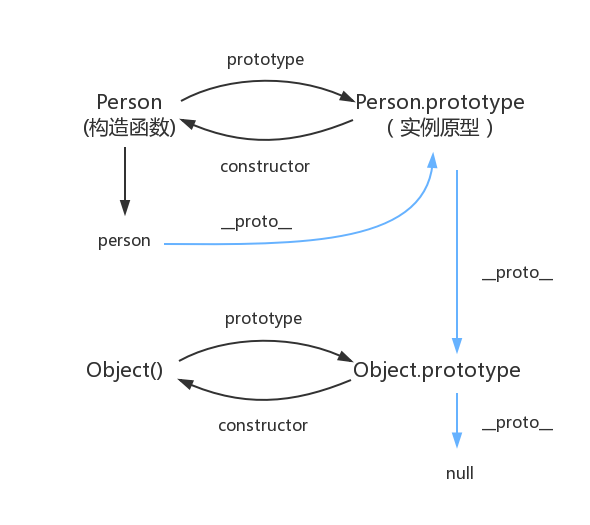
函数都有prototype属性,它指向原型对象。 实例对象有__proto__属性,它指向对象原型 每一个原型对象都有constructor输赢,指向构造函数,每一个原型对象又具有__proto__属性,这个指向Object.prototype.在这里插入图片描述...

Node 调用 dubbo 服务的探索及实践

2.Dubbo简介 2.1 什么是dubbo Dubbo是一款高性能、轻量级的开源Java RPC框架,它提供了三大核心能力:面向接口的远程方法调用,智能容错和负载均衡,以及服务自动注册和发现。 2.2 流程图 Provider : 暴露服务的服务提供方。 Consumer : 调用远程服务的服务消费方。 Registry : 服务注册与发现的注册中心。 Monito...

猜你喜欢

mysql总结

mysql基础入门的总结     关于数据库:     数据库是软件开发人员要掌握的基本工具,软件的运行的过程就是操作数据的过程,数据库中的数据无非就是几个操作:增-删-查-改。         Mysql安装完成后,需要配置变量环境,找到配置路径path,然后把mysql安装目录bin文件导入就可以了。 然后运行cm...

adb及monkey常用命令

adb常用命令: 查看手机是否连接:adb devices   连接设备:adb connect 设备ip:端口号  若有连接多个设备需指明设备ip及端口号 安装APP:adb install [-r] 包名  -r表示覆盖安装,首次安装可省略 卸载APP:adb uninstall 包名 列出设备中所有应用包名:adb shell pm list packages ...

PC端浏览器如何设置无图模式

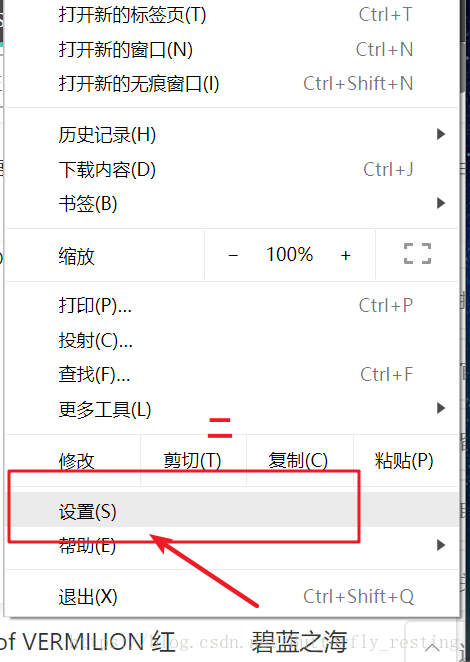
以谷歌浏览器为例,注意有些浏览器并不支持该功能。 1)打开自定义与控制 2)选择设置 3)查看左边状态栏,选择高级设置--》隐私设置和安全性 4)选择内容设置 5)图片 6)选择不显示任何图片,其中也可以只禁用某些网站图片,或者只开启自己想显示图片的网站...

2021-06-08

IDEA中使用springMVC 出现 404请求的资源不可用的其他一个可能原因 如果你确认你在视图解析器中的路径设置没有问题,各种文件名都没问题,却依然出现资源不可用错误 你可以检查这个页面中是否为web部署了工件,没有的话部署一下就好了。...

树莓派连接wifi个人热点和远程windows远程登录

1.安装完系统后在该目录下新建wpa_supplicant.conf文件填入以下信息 ssid是wifi名字 psk是wifi密码 priority:连接优先级,数字越大优先级越高 2.插入sd卡开机自动连接 3.利用ssh登陆树莓派 4. 输入命令 sudo apt-get install xrdp 安装 5.利用windows远程桌面登陆   6.输入登陆用户名密码,完成...

问答精选

Correctly formatting GCM notifications?

I'm currently trying out the google cloud messaging service with its sample application "Guestbook." https://developers.google.com/cloud/samples/mbs/ I'm attempting to send notifications tha...

Are there any performance benefits of using Asynchronous functions over Synchronous in Node Js?

Now I came across an article that distinguishes between an Asynchronous function and Synchronous functions. From my understanding of the different examples and explanations, synchronous functions are ...

Python: Costing calculator output

Good day all I'm busy creating a small costing calculator for the signage department. I'm not getting the calculator to output the amount. Brief Description: You enter the height and width and then wh...

Flask-SQLAlchemy - model has no attribute 'foreign_keys'

I have 3 models created with Flask-SQLalchemy: User, Role, UserRole role.py: user.py: user_role.py: If I try (in the console) to get all users via User.query.all() I get AttributeError: 'NoneType' obj...

Seeding many PRNGs, then having to seed them again, what is a good quality approach?

I have many particles that follow an stochastic process in parallel. For each particle, there is a PRNG associated to it. The simulation must go through many repetitions to get average results. For ea...

相关问题

相关文章

热门文章

推荐文章

相关标签

推荐问答