Android Theme、colorPrimary、colorPrimaryDark、colorAccent详解
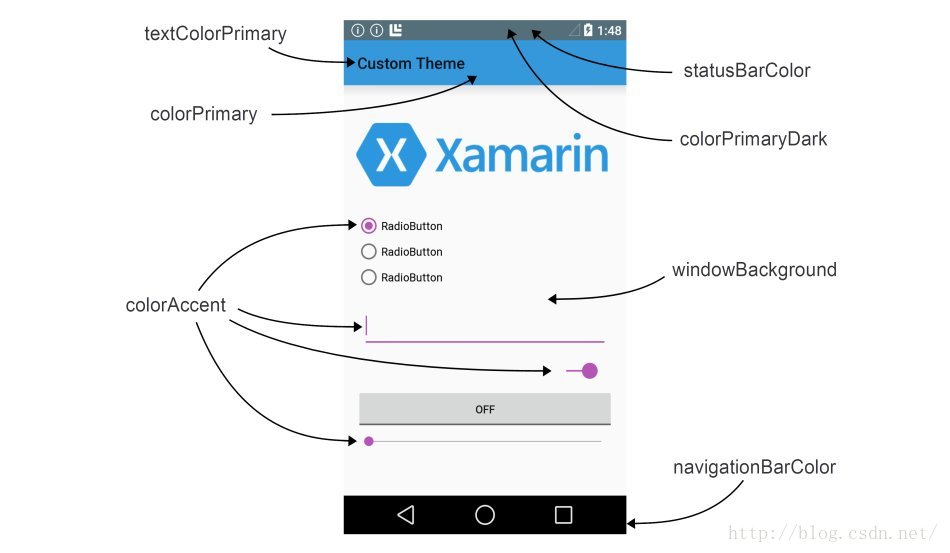
<!--状态栏颜色-->
    <item name="colorPrimaryDark">@color/colorPrimaryDark</item>
    <!--控制各个控件被选中时的颜色-->
    <item name="colorAccent">@color/colorAccent</item>
    <!--页面背景色-->
    <item name="android:windowBackground">@color/windowBackg</item>
    <!--底部导航栏颜色-->
    <item name="android:navigationBarColor">@color/navigationColor</item>
    <!--Appbar背景色-->
    <item name="android:colorPrimary">@color/colorPrimary</item>
    <!--ToolBar上的Title颜色-->
    <item name="android:textColorPrimary">@color/textColorPrimary</item>
    <!--各个控制控件的默认颜色-->
    <item name="android:colorControlNormal">@color/colorControlNormal</item>
来源:网络
智能推荐
Android Attr、Style和Theme详解
关于Attr、Style和Theme详解 本文主要参考以下三篇博客的内容,感谢三位的分享 1.Attr、Style和Theme详解 2.一些关于style和attr的使用问题 3. Android中View自定义XML属性详解以及R.attr与R.styleable的区别 一:定义及基本使用方法 Attr:属性,风格样式的最小单元; Style:风格,它是一系列Attr的集合用以定义一个View的...

Android中的Style、Theme详解已经发展史
Style介绍 style就像单词意思一样,风格,这里面是属性的集合,如果页面中有许多控件的属性值相同那么就可以把这些属性抽出来放到style里面,定义也很简单,在values文件下的styles里面创建就可以了。 例如: Style的使用 这个相对来说就简单了,系统中也为我们预先定义了许多style,看了上一篇介绍的attr相信系统定义的这些style也会看懂吧。 文章最早发布于我的微信公众号 ...
Android主题Theme
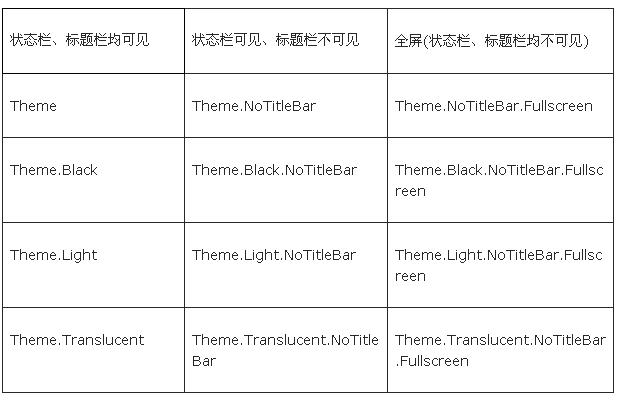
简述: 主题Theme就是用来设置界面UI风格,可以设置整个应用或者某个活动Activity的界面风格。在Android SDK中内置了下面的Theme,可以按标题栏Title Bar和状态栏Status Bar是否可见来分类: android:theme="@android:style/Theme.Dialog" 将一个Activity显示为能话框模式 androi...
Android 主题Theme讲解
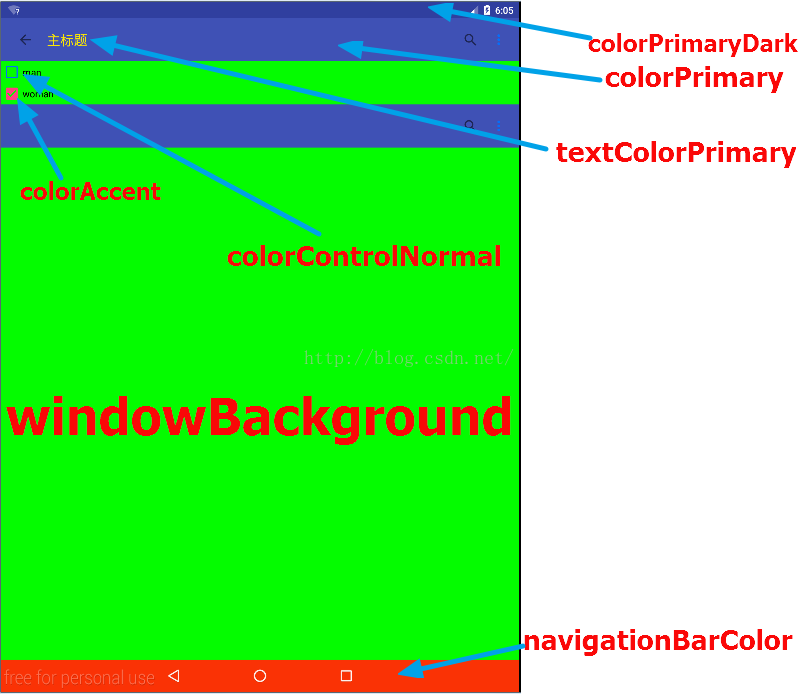
Android开发中,我们可以通过控制属性的值,改变界面的颜色来自定义界面主题 colorPrimary—导航栏颜色 colorPrimaryDark—通知栏颜色 colorAccent—控件选中后颜色 Android中colorPrimaryDark与statusBarColor的异同 相同点:‘ &nbs...

android Theme使用总结
为什么80%的码农都做不了架构师?>>> 我将api中theme分为两种类型来实验;一种是api Level为11的,一种是11以下的。level为11的用的是3.0的模拟器,11以下用的是N1,2.3.3的系统。 这里我是统一将Theme写在AndroidManifest.xml中定义,如下图: 先总结level为11以下的Theme: 1...
猜你喜欢

Android系统自带样式(android:theme)
Android系统自带样式(android:theme) Theme.Dialog : (图1)Activity显示为对话框模式 Theme.NoTitleBar : (图2)不显示应用程序标题栏 Theme.NoTitleBar.Fullscreen : (图3)不显示应用程序标题栏,并全屏 Theme.Light : (图4)背景为白色 Theme.Light.No...

Android attrs,style,theme关系
一,attrs和style 多个属性attr 具体值的集合组成一个style 。 attrs是控件的基础属性,例如:宽,高,颜色,边框,对齐方向等等。attrs用于声明属性名称和属性值类型。 例如: style是控件中多个属性attrs的集合。style用于,集合多个具体的属性值。(属性已经需要具体赋值了) 二,style和theme theme声明的方式和style一样,...
[转]Android 主题Theme讲解
Android开发中,我们可以通过控制属性的值,改变界面的颜色来自定义界面主题 colorPrimary—导航栏颜色 colorPrimaryDark—通知栏颜色 colorAccent—控件选中后颜色 Android中colorPrimaryDark与statusBarColor的异同 相同点:‘ &nbs...
【Android】详解Android Activity
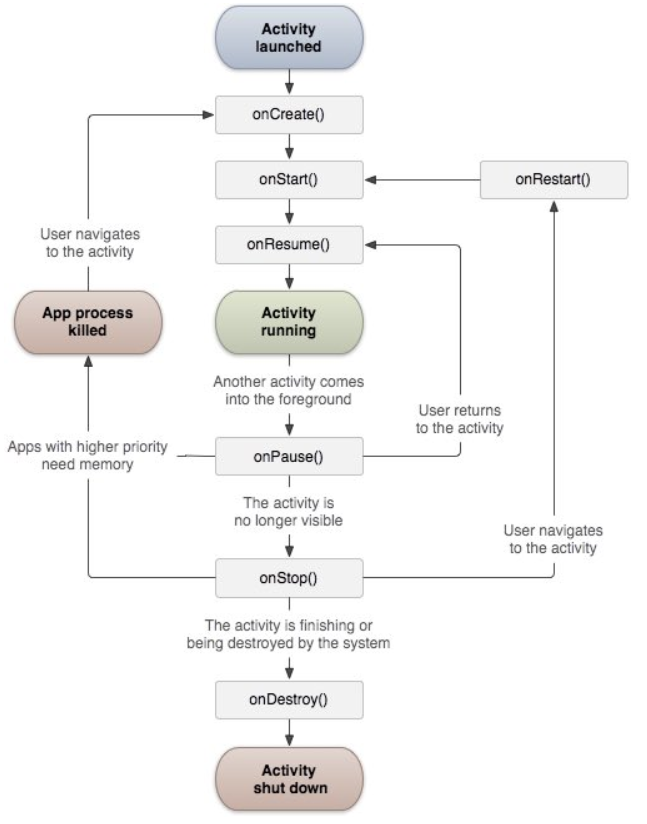
目录结构: contents structure [+] 创建Activity 如何创建Activity 如何创建快捷图标 如何设置应用程序的名称、图标与Activity的名称、图标不相同 Activity的跳转 显式意图 隐式意图 显示意图和隐式意图的比较 Activity跳转时的数据传递 使用Intent的putExtra传递 使用Intent的Bundle传递 使用Activity销毁时传递...
QT的温湿度显示系统
大家好,这里是石侃侃的博客,欢迎前来讨论 这篇文章介绍的是DHT11在2440上的基于Qt5.6的应用 基于单片机系统的温湿度监测系统构成框图如图2-1所示。 图2-1 系统构成框图 该系统采用单片机s3c2440作为了本设计的核心元件。利用LCD作为了显示器件,利用触摸屏作为用户界面输入设备,第一行显示当前实时的温度,湿度,第二行依次显示历史时刻最高的温度值,最高的湿度值。第三行是一...
问答精选
TensorFlow Object Detection API poor results
I have trained TensorFlow Object Detection API on my own PascalVOC dataset with 7 classes. In each class there are from 100 to 200 images. I was using ssd_mobilenet_v1_pets.config standard configurati...
How can I indent a line by several steps in VIM?
How can I indent a line by several steps in VIM? To understand my question, see the example blow: >> indents the current line by one step. 2>> indents two lines by one step Or V2> inden...
Method references in Java 8: is overloading supported?
Is there any way to refer to a group of methods in Java 8, which varies their signature the overloading way? More precisely, I'd like this code to work: I cannot afford to add public static void foo (...
Tkinter: How do I build an application for several different screen resolutions
So I'm working on an application in Python with Tkinter as the GUI framework. The first picture is a screenshot from my coworkers computer, the second is a screenshot from my computer. How can I make ...
Problems to initialize Analytics in ANDROID app
I'm facing problems to use Analytics in my Android App. I'm using the default class generated by Android Studio I don't know how to initialize it, if I do it in the MainActivity in onCreate() each tim...
相关问题
- android statusbarcolor vs colorprimarydark
- 如何以编程方式更改ColorPrimary,ColorPrimarydark和ColorCence
- 主题中的ColorPrimary和ColorPrimaryDark有什么区别
- Android Theme.AppCompat主题
- 使用例如使用什么区别Android:Coloraccent和Coloraccent属性?
- Android:Seekbar- Coloraccent的向下兼容性
- 如何更改ReactJ中的Android主题颜色(ColorPrimaryDark)
- Android:themy =“@style/theme.holo.lights”
- 没有资源发现与给定名称匹配的资源(在'android:colorprimary'带Value'@android:colors/blue')。2
- Android Theme.AppCompat.light.NoActionBar无法解决
相关文章
- Android 之@style/AppTheme:colorPrimary、colorPrimaryDark、colorAccent
- android colorPrimary、colorPrimaryDark和colorAccent都代表什么意思
- Android进阶之路 - colorAccent,colorPrimary,colorPrimaryDark属性讲解
- Android应用资源总结四:colorAccent,colorPrimary,colorPrimaryDark等的意义
- colorAccent,colorPrimary,colorPrimaryDark等
- colorAccent,colorPrimary,colorPrimaryDark……来这里你就明白了
- colorAccent,colorPrimary,colorPrimaryDark……关于颜色的一切?
- colorAccent,colorPrimary,colorPrimaryDark……来这里你就明白了
- 安卓 各属性指定颜色的位置(colorAccent,colorPrimary,colorPrimaryDark)
- Android Design与Holo Theme详解
热门文章
推荐文章
相关标签
推荐问答
- Getting the element that the plugin was binded to in jQuery?
- USB : gadget : device mode : configfs: uvc and mass storage on single configuration?
- Create API for MySQL database
- Can I use face-recogition npm package in react?
- dot replacement with replaceText apps script google document (not sheets)
- resignfirstresponder crashes my ios app
- How to make all instances of a template function friends of a class?
- When to use ref and when it is not necessary in C#
- The use of \s in replace vs regular expressions
- How to execute spark sql multiline query when stored as a string variable?