Gem Windows 环境添加 Ruby China Gems 源的 SSL 异常问题解决记录
技术标签: Ruby SSL异常
#ruby 添加gem源的ssl异常问题解决记录
异常SSL_connect returned=1 errno=0 state=SSLv3 read server certificate B: certificate verify failed
问题现象:
gem source --add 添加国内源时,报ssl certificate 的异常,使用http问题也一样:
  C:\WINDOWS\system32>gem sources --add  http://gems.ruby-china.org

Error fetching http://gems.ruby-china.org:
        SSL_connect returned=1 errno=0 state=SSLv3 read server certificate B: certificate verify failed (https://upyun.gems.ruby-china.org/specs.4.8.gz)

 C:\WINDOWS\system32>gem sources --add  https://gems.ruby-china.org

 Error fetching https://gems.ruby-china.org:
        SSL_connect returned=1 errno=0 state=SSLv3 read server certificate B: certificate verify failed (https://gems.ruby-china.org/specs.4.8.gz)
环境说明
Microsoft Windows [版本 10.0.14393]
(c) 2018 Microsoft Corporation。保留所有权利。

C:\Users\Administrator>ruby -v
ruby 2.5.1p57 (2018-03-29 revision 63029) [x64-mingw32]

C:\Users\Administrator>gem -v
2.7.7
Ruby 安装 - Windows
https://rubyinstaller.org/downloads/
Ruby Gems 下载
https://rubygems.org/pages/download
增加新的pem证书,解决问题
下载新证书: http://curl.haxx.se/ca/cacert.pem
配置环境变量:SSL_CERT_FILE 值为刚下载证书的存放位置: C:\Ruby21-x64\lib\ruby\site_ruby\2.1.0\rubygems\ssl_certs\cacert.pem
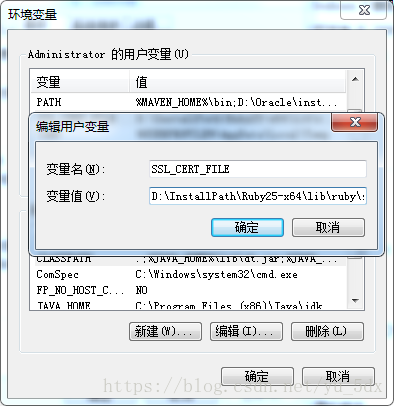
打开新的cmd窗口
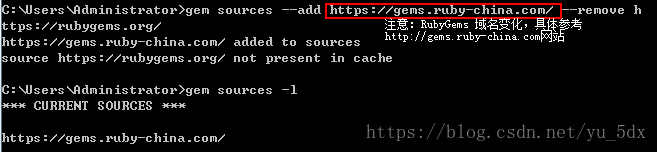
RubyGems 域名变化,官方网站有公告!!!http://gems.ruby-china.com/
问题解决--------------2018/9/29
来源:网络
智能推荐
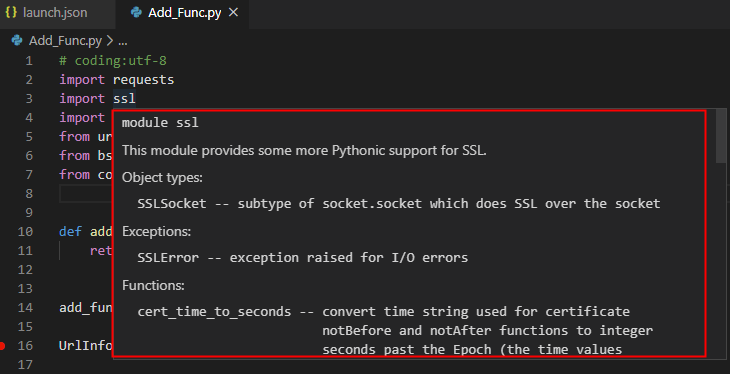
Windows Anaconda 64位 和 32位环境并存的情况下 SSL 导入报错的问题解决
Windows7 Anaconda 64位 和 32位环境并存的情况下 SSL 导入报错的问题解决 并存请参考一下文章 用anaconda保证64位和32位的python共存:https://blog.csdn.net/ruibin_cao/article/details/83962271 实际操作 我在vs code中打开了一个py文件,并import ssl模块 如图: vs code左下角选...

windows下搭建Ruby(基于eclipse的环境)开发环境
2019独角兽企业重金招聘Python工程师标准>>> 今天突发奇想想学学Ruby,作为一个完完全全的新手,我想搭建环境是最重要的了吧。下面就将我今天搭建环境的过程跟大家分享一下,还请各位多多指教。 1,下载Ruby环境,下载完成后,安装,回自动设置好path。进入cmd,执行如下命令: C:\>ruby -v,回看到如下结果。 ruby 1.9.2p180 ...
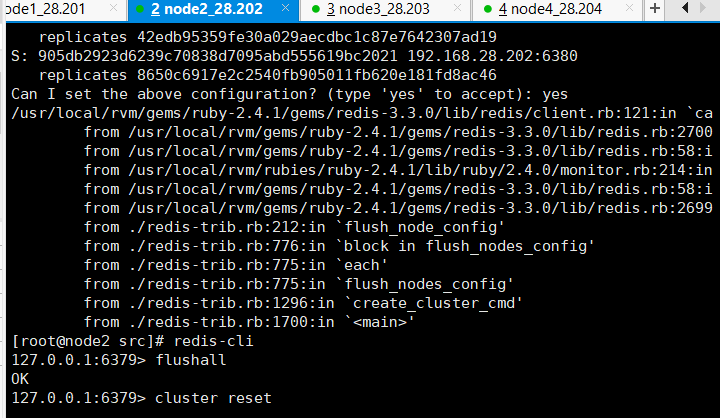
redis集群搭建时的错误:/usr/local/rvm/gems/ruby-2.4.1/gems/redis-3.3.0/lib/redis/client.rb:121:in `cal`
今天在搭建redis集群时遇到以下问题 我的环境 四台虚拟机,其中两台部署两个redis节点,实现三主三从架构。 各节点的的host文件中已经配置好主机名,网络没问题,并且可以ping通。 遇到的问题: 在搭建完六个节点后,使用命令创建集群时候的错误。 命令:./redis-trib.rb create --replicas 1 192.168.28.201:6379 192.168.28.202...

windows系统下ruby开发环境的搭建方法
ruby是一种简单快捷的面向对象的脚本语言,非常直观。下面说一下windows系统下ruby开发环境的搭建方法。 工具/原料 rubyinstaller.exe 方法/步骤 1 到如下网站去下载最新的rubyinstaller.exe 下载好以后就要开始安装了,安装也很简单,傻瓜式的,到如下一步时别忘了把标注的选项打上勾 3 安装完成后,打开cmd命令窗口,输入 ruby -v,就能...

liunx环境通过gem安装pg问题
1.建议使用rvm方式安装ruby 好处:里面已包含了gem(PS:其他安装方式遇到了各种问题) 官网: https://rvm.io/ 安装完成后,会列出一些安装信息,其中有一行要注意: To start using RVM you need to run source /etc/profile.d/rvm.sh 意思是如果要开始使用需要执行一个 source 命令来重新执行刚修改的初始化文件,...
猜你喜欢
Ruby入门(1)——windows下Ruby开发环境搭建
1、获得和安装Ruby 1.1 获取Ruby 1) 从 http://www.ruby-lang.org/en/downloads/ 下载Source Code或者RubyInstaller 2) 从 http://rubyforge.org/frs/?group_id=167 下载RubyInstaller ...
Android SSL异常问题解决
文章允许转载,请注明来源:https://blog.csdn.net/feiniao8651/article/details/83715491 背景 一直使用的是阿里云免费的ssl证书,免费的午餐肯定是有一些缺点的,就是有效期只有一年,过每年都要重新申请一次证书。服务器最近证书到期了,换了新的证书到服务器之后,电脑上https访问是正常的,chrome浏览器的地址栏里能看到安全标识。但是在Andr...
windows10 ruby环境搭建
windows10: 使用rubyinstaller 安装ruby。download地址:http://rubyinstaller.org/downloads/; 安装devkit。 download地址 同上; devkit安装完毕后,在devkit目录下执行命令:ruby dk.rb init。 按提示在config.yml文件中添加ruby路径。注意不要添加到bin目录,添加路径为安装路径:...
Windows环境下安装Ruby教程
安装背景: SASS是一种CSS的开发工具,提供了许多便利的写法,大大节省了设计者的时间,使得CSS的开发,变得简单和可维护。SASS是Ruby语言写的,但是两者的语法没有关系。不懂Ruby,照样使用。只是必须先安装Ruby,然后再安装SASS。然后我就安装了Ruby 过程如下: 首先打开Ruby的下载地址https://rubyinstaller.org/downloads/ 如果您不知道要安装...

在Windows中搭建Ruby开发环境
Windows中搭建Ruby开发环境教程 1. 下载RubyInstaller 去RubyInstaller.org官网中下载 2. 安装Ruby 双击Ruby安装包 RubyInstaller,直接下一步操作就可以了。 等安装完成,运行命令:ruby -v,显示版本号就说明安装成功。 3. 安装Devkit 在rubyinstaller.org上下载相对应版本的Devkit; 解压下载的DevK...
问答精选
How do I create an Sqlite3 database using luasql?
I am trying to create a Sqlite3 database with luasql. After I require luasql.sqlite3, how do I create the database on a file? Also, I can't seem to find the manual for luasql. Is it available anywhere...
Powershell AD: counting groups in office
I am having issues in my thought process. I want an output of something like 'Group Name' 'Title' 'Count' and I am able to get the 'Group Name' and 'Title' Columns but I'm not sure how to count, say, ...
Cordova File Transfer download fails ios 9 - Response Code 200
I try to download a file with cordova. These setting for ios: Cordova 6.3.1, file plugin 3.0.0, file transfer plugin 1.4.0, Xcode 7, ios 9.3.4 on test system But also in a Windows 10 uwp-App. The down...
Adding paragraphs to automated email
I have created a script that automatically sends out emails that pulls information from several cells and populates the body of the email with the information alongside a standard body of the text. Ho...
KrbException error during token exchange
I'm testing default oracle example client and server code: http://pastebin.com/FjGMGwmN and got this strange error on linux (in Windows it's another error, i will open another question): KrbException:...
相关问题
- GEM:GEMS的文件权限错误问题(不重复)
- Ruby Rails Gems问题
- Windows 7上的Ruby GEM安装问题
- 我如何知道Ruby Gems正在使用什么Ruby Gem?
- Ruby的GRPC(v1.3.2)GEM SSL/TLS连接问题完全由Golang构建
- 如何让Ruby Gems包括Gem的所有依赖性,甚至在Beta中均?
- 我的Ruby Gems设置有什么问题?
- Ruby可以真正有设计模式的设计问题解决吗?
- 为什么在Windows 7上使用1.9.1的Gems路径是Ruby 1.9.2?它使用c:/ruby192/lib/ruby/gems/1.9.1/gems/reailties-3.0.0/lib/RAILS/Commands.rb
- 如何在不编辑GEM源的情况下添加一种方法到Ruby Gem?
相关文章
- https://gems.ruby-china.org/源添加失败
- rails/ruby/gem/RubyOnRails环境搭建-Windows
- CocoaPods 加载问题 hostname "gems.ruby-china.org" does not match the server certificate
- Error fetching https://gems.ruby-china.org/: bad response Not Found 404 解决方法
- Windows环境下Ruby离线安装gem包
- 如何修改Ruby的gem源(gem sources)
- centos安装ruby及更换gem的源
- ruby1.9.2+gem1.3.7+Rails3.0.1 windows下安装
- Windows上Ruby开发环境的配置
- 为Web开发提供的10个Ruby on Rails Gems
热门文章
推荐文章
相关标签
推荐问答
- Hash Functions and Keeping Passwords Protected
- Which automation tool suits for hydraulic machines automation
- Possible thread unsafe operation on std::map
- is it possible to allow merge but forbid directly committing in git
- Scrapy HTTP Request error when trying to send request login on nike site
- write scraped binary file to blob without first writing it to disk
- How to use md5.js within a compontent?
- IEnumerable when I get a real reference on the objects?
- Excel add a sequential number to based on unique id column
- C#: When adding an Item to a List, the previous List Items get overwritten with the Item as well. Why?