Windows Azure Cloud Service (12) PaaS之Web Role, Worker Role, Azure Storage Queue(下)
《Windows Azure Platform 系列文章目录》
本章DEMO部分源代码,请在这里下载。
在上一章中,笔者介绍了我们可以使用Azure PaaS的Web Role和Worker Role来处理复杂的业务逻辑
-Web Role可以快速响应前端的业务请求,并将输入保存到Azure Storage Queue中
-Worker Role将数据从Queue中读取,可以在后端处理复杂的业务逻辑
-可以看到,Azure Storage Queue是前端业务逻辑和后端业务处理的桥梁
该架构图可以用下图表示:

有关Azure Storage Queue的知识,可以参考Windows Azure Storage (1) Windows Azure Storage Service存储服务
接下来,我们模拟一个场景:
1.前端用户通过Web Role的Asp.NET页面,将输入框的内容增加到Azure Storage Queue中
2.后端的Worker Role,通过WorkerRole.cs中的Run()函数,从Azure Storage Queue中拿到消息内容,进行输入。处理完毕后,将该消息删除。
注意:本章内容中,Web Role只响应前端的页面请求。Worker Role在后端处理复杂的业务处理。
Web Role和Worker Role是计算分离的(注意是计算分离,不是多线程)。
因为Web Role和Worker Role是部署在不同的计算节点上。不会因为用户访问Web Role,造成CPU压力过高而影响Worker Role。
以下是源代码讲解部分:
1.首先,我们创建一个新的cloud project,重命名为AzureWorkerRole。图略:
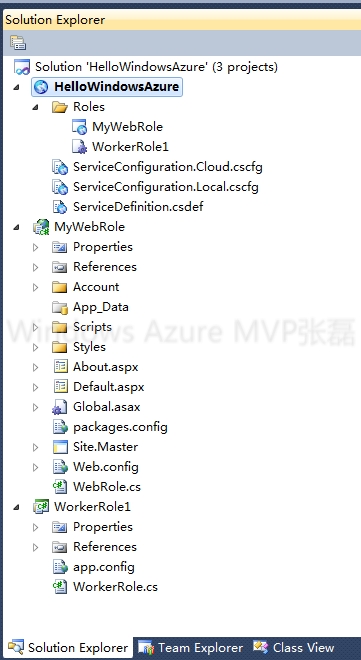
2.在项目文件中,添加Web Role和Worker Role。如下图:
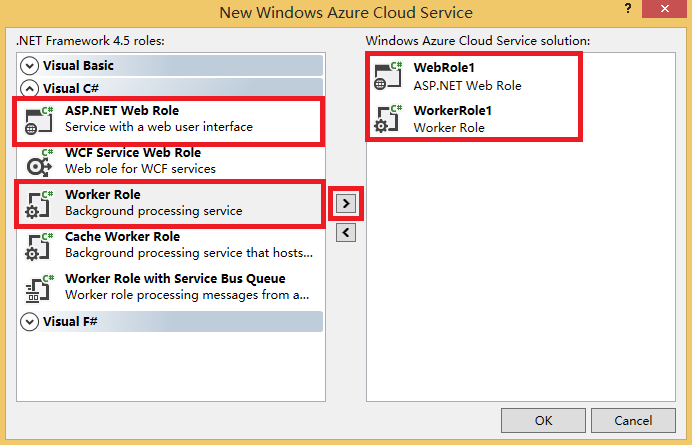
模板我们选择Web Form。图略。
3.在WebRole1中,增加Default.aspx页面,添加TextBox和Button控件。增加以下代码:

using System;
using System.Collections.Generic;
using System.Linq;
using System.Web;
using System.Web.UI;
using System.Web.UI.WebControls;
using Microsoft.WindowsAzure.ServiceRuntime;
using Microsoft.WindowsAzure.Storage;
using Microsoft.WindowsAzure.Storage.Queue;

namespace WebRole1
{
    public partial class Default : System.Web.UI.Page
    {
        protected void Page_Load(object sender, EventArgs e)
        {

        }

        protected void btnSubmit_Click(object sender, EventArgs e)
        {
            AddMessage(txbInput.Text.Trim());
            txbInput.Text = "";
        }
        /// <summary>
        /// 将消息加入到Azure Storage Queue
        /// </summary>
        /// <param name="inputMessage"></param>
        private void AddMessage(string inputMessage)
        {
            var account = CloudStorageAccount.Parse(RoleEnvironment.GetConfigurationSettingValue("StorageConnection"));
            var queueClient = account.CreateCloudQueueClient();
            var queue = queueClient.GetQueueReference("taskqueue");

            queue.CreateIfNotExists();

            CloudQueueMessage message = new CloudQueueMessage(inputMessage);
            queue.AddMessage(message);
        }
    }
}
核心代码为queue.AddMessage()。将消息内容增加到Azure Storage Queue中。
4.在WorkerRole.cs增加以下代码:
  /// <summary>
        /// Editor: Lei Zhang
        /// Create Azure Storage Queue
        /// </summary>
        private void CreateAzureStorageQueue()
        {
            var account = CloudStorageAccount.Parse(RoleEnvironment.GetConfigurationSettingValue("StorageConnection"));
            var queueClient = account.CreateCloudQueueClient();

            //Azure Storage Queue名称必须为小写
            var queue = queueClient.GetQueueReference("taskqueue");
            queue.CreateIfNotExists();
        }

        /// <summary>
        /// 从Azure Storage Queue中读取数据
        /// </summary>
        private void GetQueue()
        {
            var account = CloudStorageAccount.Parse(RoleEnvironment.GetConfigurationSettingValue("StorageConnection"));
            var queueClient = account.CreateCloudQueueClient();

            //Azure Storage Queue名称必须为小写
            var queue = queueClient.GetQueueReference("taskqueue");
            queue.CreateIfNotExists();

            // dequeue the message and lock message in 30 seconds
            CloudQueueMessage retrievedMessage = queue.GetMessage(TimeSpan.FromSeconds(30));
            if (retrievedMessage == null) return;

            Trace.TraceInformation("Retrieved message with content '{0}'", retrievedMessage.AsString);

            // Async delete the message
            queue.DeleteMessage(retrievedMessage);
            Trace.TraceInformation("Deleted message");
        }
Worker Role的核心代码为上面的queue.GetMessage(TimeSpan.FromSeconds(30))和 queue.DeleteMessage()。
当有多个Worker Role的情况下,某个Worker Role Instance使用queue.GetMessage(TimeSpan.FromSeconds(30))读取到Queue Message的时候,默认会在这个消息上加一个锁,时间间隔为30秒。
在30秒内,其他Worker Role Instance不会读取到这个Message,以防止Message被重复读取。
Message被读取到并处理完毕后,记得用DeleteMessage删除该消息
我们还可以通过以下API,批量读取20条消息(Queue Message),最多读取32个消息。同时将读取每一条消息的锁设置为5分钟
foreach (CloudQueueMessage message in queue.GetMessages(20, TimeSpan.FromMinutes(5)))
{
    // Process all messages in less than 5 minutes, deleting each message after processing.
    queue.DeleteMessage(message);
}
5.最后我们在Web Role和Worker Role的Settings,增加相应的Azure Storage Connection String连接字符串。

6.我们在本地,通过Visual Studio 2013运行程序。在Default.aspx页面中输入消息内容,如下:

7.然后我们打开本地模拟器,可以看到Worker Role的输出。

8.我们重复在Default.aspx页面中输入多个值。在本地模拟器,可以看到Worker Role的多个输出。

9.我们可以在WorkerRole.cs的代码中,还可以异步处理其他复杂的业务逻辑,比如异步发送邮件,异步处理数据等等。
本文转自Lei Zhang博客园博客,原文链接:http://www.cnblogs.com/threestone/p/4201065.html,如需转载请自行联系原作者
来源:https://yq.aliyun.com/articles/381845
智能推荐

Windows Azure VM Role (7) 创建服务
《Windows Azure Platform 系列文章目录》 OK,前几章我们已经在VHD里安装了Windows Server 2008 R2操作系统,并且还安装了.NET Framework 3.5和IIS。最后成功的将VHD上传到Windows Azure位于香港的数据中心里。 现在OS、Middleware和Runtime都准备好了,但我们还缺少web应用让用户浏览和使用...

Windows Azure Storage (1) Windows Azure Storage Service存储服务
《Windows Azure Platform 系列文章目录》 如果读者使用的是国内由世纪互联运维的Azure China服务,请参考笔者的博文Azure China (4) 管理Azure China Storage Account update 2014-3-31 Windows Azure Storage带宽10GB,WindowsAzure ...
Windows Azure Storage (4) Windows Azure Storage Service存储服务之Blob Share Access Signature
《Windows Azure Platform 系列文章目录》 如果读者使用的是国内由世纪互联运维的Azure China服务,请参考笔者的博文Azure China (4) 管理Azure China Storage Account 如果需要参考Azure China使用SAS Token的Sample Code,请参考笔者的博文:Azure China (10) 使用...
Windows Azure Storage (2) Windows Azure Storage Service存储服务之Blob详解(上)
《Windows Azure Platform 系列文章目录》 如果读者使用的是国内由世纪互联运维的Azure China服务,请参考笔者的博文Azure China (4) 管理Azure China Storage Account 如果需要参考Azure China使用SAS Token的Sample Code,请参考笔者的博文:Azure China (10) 使用...

Windows Azure Storage (10) Windows Azure 上的托管服务CDN (下) Hosted Service
《Windows Azure Platform 系列文章目录》 使用Blob Service CDN需要将所有需要缓存的文件放入Blob Service中,然后设置CDN指向这个Storage Service。但是大部分情况下,特别是在进行网站开发的情况下,使用的图片一般都是放在网站目录下而非Blob Service中。虽然可以将这些文件迁移到Blob中,但是在开发的时候还是需...
猜你喜欢

Windows Azure VM Role (6) 将VHD上传到Windows Azure平台
《Windows Azure Platform 系列文章目录》 之前的4节内容里,我们已经创建了一个VHD(Virtual Hard Disk),这个VHD包含的内容有 Windows Server 2008 R2操作系统 其他软件(Office、ESRI ArcGIS等) IIS .NET Framework 3.5 Windows Azure VM Role Integratio...

Windows Azure Storage (6) Windows Azure Storage之Table
《Windows Azure Platform 系列文章目录》 最近想了想,还是有必要把Windows Azure Table Storage 给说清楚。 1.概念 Windows Azure Table是存储在云端的非关系型数据表,主要存储结构化数据,简单理解上来是类似SQL Server的一张单表,包含了列名和行数据,但是无法执行关系型运算(...
Windows Azure Cloud Service (38) 微软IaaS与PaaS比较
《Windows Azure Platform 系列文章目录》 最近一直想总结Azure IaaS和PaaS的区别与比较,写个博文详细说明一下。建议读者在阅读之前,先熟悉微软PaaS和IaaS平台的基本概念,再参考本文。 1.Azure IaaS和PaaS的服务类型层次,请参考下面的图片: 对于IaaS来说,用户需要管理的对象是: -O/S,操作系...
Windows Azure Cloud Service (7) Windows Azure项目文件详解
《Windows Azure Platform 系列文章目录》 本章是对Windows Azure Platform (十三)开发一个简单的Hello World 的补充和说明,让大家对于Visual Studio 2010 Cloud Application有一个更加具体和全面的了解。 1.Emulator Windows Azure允许您在Windows Azure E...

Windows Azure Cloud Service (29) 在Windows Azure发送邮件(下)
《Windows Azure Platform 系列文章目录》 前2章我们已经介绍了Windows Azure发送邮件的两种方法,分别是使用on-premise的Email Forward Service和Exchange Server。 现在我们介绍第三种方法:使用第三方SMTP服务。 源代码您可以在这里下载,有三点我们需要了解: 在Windows Azure应用...
问答精选
URL for a user content site and SEO
I was thinking about how i should write my URLs. I want them to A) Be user friendly B) SEO C) allow fast DB queries. The information i have are username, category, mediaId, title and other data i dont...
How to use the Clojure -> macro with an inner function
I'm a Clojure beginner and I want to understand the -> macro This code works: But this doesn't even compile and I don't know how to deal with the error message: CompilerException java.lang.IllegalA...
Java Program to make Tic Tac Toe not working
For my programming class I'm supposed to make a program that simulates a game of tic tac toe. My teacher provided all the methods and said we shouldn't need to add any or take any away, and told us we...
How can i exit the for statement in assembly
The purpose of this code is to flash the bits turned on three times, exit the loop and turn them off. Currently the code seems to be in an infinite loop and does not exit the loop after the count is 0...
Simple Camel test fails with no messages recieved
Am using Spring Boot and I have just added camel to it. I have a simple camel route setup : When I try to create simple test for this route with : It fails with Not sure what could be a problem here. ...
相关问题
- 发出Azure Cloud Service Web角色,指向SQL Azure
- Azure Cloud Service部署问题
- 是否使用Worker角色或Web角色:Windows Azure
- Azure Cloud Service:修改服务定义
- 如何登录Azure Cloud Classic Service实例?
- 远程桌面Azure Cloud Service Classic
- Azure,Cloud Service,用.NET扩展
- 缺少“出版为Azure Cloud Service”
- Azure EventHubs EventProcessorHost tries to acess Azure storage queue
- Azure Cloud Services Worker角色中有GPU吗?
相关文章
- Windows Azure Cloud Service (11) PaaS之Web Role, Worker Role(上)
- Windows Azure Cloud Service (17) Role Endpoint
- Windows Azure Cloud Service (18) 基于Input Endpoint通过Worker Role发布WCF服务
- Windows Azure Cloud Service (43) 使用Azure In-Role Cache缓存(2)Dedicated Role
- Windows Azure Cloud Service (10) Role的生命周期
- Windows Azure Cloud Service (22) Web Role的Full IIS特性
- Windows Azure Cloud Service (42) 使用Azure In-Role Cache缓存(1)Co-located Role
- Windows Azure VM Role (5) 安装Azure VM Role组件
- Windows Azure VM Role (5) 安装Azure VM Role组件
- Windows Azure VM Role (2) 创建VHDVHD
热门文章
推荐文章
相关标签
推荐问答
- Jetty Jars Upgradation
- Beginner getting addEventListener is not a function; no jQuery
- R data.table apply function to rows using columns as arguments which returns a vector (i.e. multiple values)
- NIO2 AsynchronousSocketChannel read/write fully using CompletionHandler
- Jboss 4.2.3 datasource can't connect to PostgreSQL
- Unable to Insert Data into stored Procedure sql server 2012 using php
- controlPage and gestures... Changing pages not working?
- How to use bundler to install activerecord 3-2-stable?
- Exception caught during firing event net.minecraftforge.event.RegistryEvent$Register@6b4d0be2: java.lang.ExceptionInInitializerError: null
- Controller function call twice in asp.net mvc