Linux2.6.39在S3C2440上的移植(二)添加yaffs2文件系统
1、主机环境:VMare下ubuntu10.04 ,1G内存。
2、编译编译环境:arm-linux-gcc
3、开发板:Micro2440,2M nor flash,256M nand flash。
4、u-boot-version:u-boot-2010.06
5、linux -version:Linux-2.6.39
2.1、yaffs2文件系统移植
a)获取yaffs2 源代码
针对嵌入式设备,现在大部分开发板都可以支持yaffs2 文件系统,特别是使用nand flash 作为存储器的嵌入式设备而创建的一种文件系统,早先的yaffs 仅支持小页(512byte/page)的nand flash,现在的开发板大都配备了更大容量的nand flash,它们一般是大页模式的(2K/page),使用yaffs2 就可以支持大页的nand flash,下面是yaffs2 的移植详细步骤。使用git工具获取yaffs2源码
root@bootloader:/home/eilian/development#apt-get install git-core
root@bootloader:/home/eilian/development# git clone git://www.aleph1.co.uk/yaffs2
Initialized empty Git repository in /home/eilian/development/yaffs2/.git/
remote: Counting objects: 6632, done.
remote: Compressing objects: 100% (3921/3921), done.
remote: Total 6632 (delta 5268), reused 3394 (delta 2642)
Receiving objects: 100% (6632/6632), 3.35 MiB | 59 KiB/s, done.
Resolving deltas: 100% (5268/5268), done.
root@bootloader:/home/eilian/development#ls
Android Bootloader Linux Tools workspace yaffs2
root@bootloader:/home/eilian/development#cdyaffs2
b)为内核打补丁
root@bootloader:/home/eilian/development/yaffs2#./patch-ker.sh c s ../Linux/linux-2.6.39
c)配置内核
root@bootloader:/home/eilian/development/Linux/linux-2.6.39# make menuconfig //在之前加载缺省文件的前提下
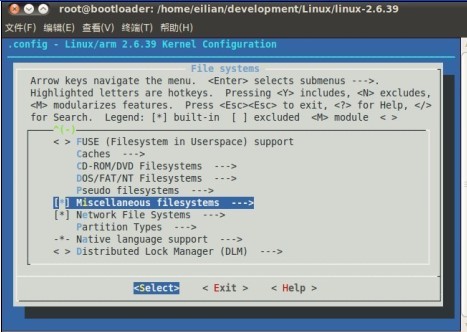
移动上下按键找到File Systems,如图

按回车进入该子菜单,再找到“Miscellaneous filesystems”菜单项,如图
按回车进入该子菜单,找到“YAFFS2 file system support”,如图
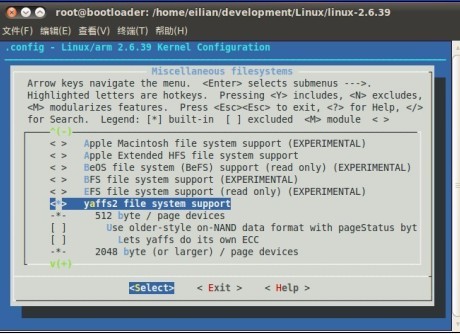
按空格选中它,这样我们就在内核中添加了yaffs2 文件系统的支持,按“Exit”退出内核配置。最好选中“Yes”保存
2.2、编译测试
root@bootloader:/home/eilian/development/Linux/linux-2.6.39#make clean
root@bootloader:/home/eilian/development/Linux/linux-2.6.39#make uImage
打开超级终端下载内核运行
U-Boot 2010.06 (Dec 03 2011 - 12:10:06)
DRAM: 64 MiB
Flash: 2 MiB
NAND: dev_id = 218
NAND 256MiB 3,3V 8-bit256 MiB
In: serial
Out: serial
Err: serial
Net: dm9000
Device nand0 not found!
Hit any key to stop autoboot: 0
bootloader# printenv
bootargs=noinitrd root=/dev/mtdblock2 init=/linuxrc console=ttySAC0 mem=64M
bootcmd=nboot 0x32000000 kernel; bootm 0x32000000
bootdelay=3
baudrate=115200
ethaddr=08:00:3e:26:0a:5b
netmask=255.255.255.0
ethact=dm9000
mtdids=nand0=nandflash0
mtdparts=mtdparts=nandflash0:1m@0(bootloader),128k(params),5m(kernel),-(root)
ipaddr=211.67.217.138
serverip=211.67.217.136
gatewayip=211.67.217.1
stdin=serial
stdout=serial
stderr=serial
Environment size: 428/131068 bytes
bootloader# tftp 32000000 uImage
dm9000 i/o: 0x20000300, id: 0x90000a46
DM9000: running in 16 bit mode
MAC: 08:00:3e:26:0a:5b
operating at unknown: 0 mode
Using dm9000 device
TFTP from server 211.67.217.136; our IP address is 211.67.217.138
Filename 'uImage'.
Load address: 0x32000000
Loading: T #################################################################
#################################################################
#################################################################
#################################################################
#################################################################
#################################################################
#####################################
done
Bytes transferred = 2182288 (214c90 hex)
bootloader# bootm 32000000
## Booting kernel from Legacy Image at 32000000 ...
Image Name: Linux-2.6.39
Created: 2011-12-02 12:29:08 UTC
Image Type: ARM Linux Kernel Image (uncompressed)
Data Size: 2182224 Bytes = 2.1 MiB
Load Address: 30008000
Entry Point: 30008000
Verifying Checksum ... OK
Loading Kernel Image ... OK
OK
Starting kernel ...
Uncompressing Linux... done, booting the kernel.
Linux version 2.6.39 (root@bootloader) (gcc version 4.3.2 (Sourcery G++ Lite 2008q3-72) ) #3 Fri Dec 2 20:27:45 CST 2011
CPU: ARM920T [41129200] revision 0 (ARMv4T), cr=c0007177
CPU: VIVT data cache, VIVT instruction cache
Machine: eilian240 development board
Memory policy: ECC disabled, Data cache writeback
CPU S3C2440A (id 0x32440001)
S3C24XX Clocks, Copyright 2004 Simtec Electronics
S3C244X: core 405.000 MHz, memory 101.250 MHz, peripheral 50.625 MHz
CLOCK: Slow mode (1.500 MHz), fast, MPLL on, UPLL on
Built 1 zonelists in Zone order, mobility grouping on. Total pages: 16256
Kernel command line: noinitrd root=/dev/mtdblock2 init=/linuxrc console=ttySAC0 mem=64M
PID hash table entries: 256 (order: -2, 1024 bytes)
Dentry cache hash table entries: 8192 (order: 3, 32768 bytes)
Inode-cache hash table entries: 4096 (order: 2, 16384 bytes)
Memory: 64MB = 64MB total
Memory: 60384k/60384k available, 5152k reserved, 0K highmem
Virtual kernel memory layout:
vector : 0xffff0000 - 0xffff1000 ( 4 kB)
fixmap : 0xfff00000 - 0xfffe0000 ( 896 kB)
DMA : 0xffc00000 - 0xffe00000 ( 2 MB)
vmalloc : 0xc4800000 - 0xf6000000 ( 792 MB)
lowmem : 0xc0000000 - 0xc4000000 ( 64 MB)
modules : 0xbf000000 - 0xc0000000 ( 16 MB)
.init : 0xc0008000 - 0xc0029000 ( 132 kB)
.text : 0xc0029000 - 0xc040a654 (3974 kB)
.data : 0xc040c000 - 0xc042fe00 ( 144 kB)
SLUB: Genslabs=13, HWalign=32, Order=0-3, MinObjects=0, CPUs=1, Nodes=1
NR_IRQS:85
irq: clearing subpending status 00000003
irq: clearing subpending status 00000002
Console: colour dummy device 80x30
console [ttySAC0] enabled
Calibrating delay loop... 201.52 BogoMIPS (lpj=503808)
pid_max: default: 32768 minimum: 301
Mount-cache hash table entries: 512
CPU: Testing write buffer coherency: ok
gpiochip_add: gpios 288..303 (GPIOK) failed to register
gpiochip_add: gpios 320..334 (GPIOL) failed to register
gpiochip_add: gpios 352..353 (GPIOM) failed to register
NET: Registered protocol family 16
S3C2440: Initialising architecture
S3C2440: IRQ Support
S3C244X: Clock Support, DVS off
bio: create slab <bio-0> at 0
usbcore: registered new interface driver usbfs
usbcore: registered new interface driver hub
usbcore: registered new device driver usb
s3c-i2c s3c2440-i2c: slave address 0x10
s3c-i2c s3c2440-i2c: bus frequency set to 98 KHz
s3c-i2c s3c2440-i2c: i2c-0: S3C I2C adapter
Advanced Linux Sound Architecture Driver Version 1.0.24.
NET: Registered protocol family 2
IP route cache hash table entries: 1024 (order: 0, 4096 bytes)
TCP established hash table entries: 2048 (order: 2, 16384 bytes)
TCP bind hash table entries: 2048 (order: 1, 8192 bytes)
TCP: Hash tables configured (established 2048 bind 2048)
TCP reno registered
UDP hash table entries: 256 (order: 0, 4096 bytes)
UDP-Lite hash table entries: 256 (order: 0, 4096 bytes)
NET: Registered protocol family 1
RPC: Registered udp transport module.
RPC: Registered tcp transport module.
RPC: Registered tcp NFSv4.1 backchannel transport module.
JFFS2 version 2.2. (NAND) Â 2001-2006 Red Hat, Inc.
ROMFS MTD (C) 2007 Red Hat, Inc.
msgmni has been set to 117
io scheduler noop registered
io scheduler deadline registered
io scheduler cfq registered (default)
Console: switching to colour frame buffer device 60x53
fb0: s3c2410fb frame buffer device
s3c2440-uart.0: ttySAC0 at MMIO 0x50000000 (irq = 70) is a S3C2440
s3c2440-uart.1: ttySAC1 at MMIO 0x50004000 (irq = 73) is a S3C2440
s3c2440-uart.2: ttySAC2 at MMIO 0x50008000 (irq = 76) is a S3C2440
brd: module loaded
S3C24XX NAND Driver, (c) 2004 Simtec Electronics
s3c24xx-nand s3c2440-nand: Tacls=3, 29ns Twrph0=7 69ns, Twrph1=3 29ns
s3c24xx-nand s3c2440-nand: NAND soft ECC
NAND device: Manufacturer ID: 0xec, Chip ID: 0xda (Samsung NAND 256MiB 3,3V 8-bit)
Creating 5 MTD partitions on "nand":
0x000000000000-0x000000100000 : "bootloader"
0x000000100000-0x000000120000 : "params"
0x000000120000-0x000000620000 : "kernel"
0x000000620000-0x000040620000 : "root"
mtd: partition "root" extends beyond the end of device "nand" -- size truncated to 0xf9e0000
0x000000000000-0x000010000000 : "nand"
ohci_hcd: USB 1.1 'Open' Host Controller (OHCI) Driver
s3c2410-ohci s3c2410-ohci: S3C24XX OHCI
s3c2410-ohci s3c2410-ohci: new USB bus registered, assigned bus number 1
s3c2410-ohci s3c2410-ohci: irq 42, io mem 0x49000000
hub 1-0:1.0: USB hub found
hub 1-0:1.0: 2 ports detected
usbcore: registered new interface driver libusual
mousedev: PS/2 mouse device common for all mice
S3C24XX RTC, (c) 2004,2006 Simtec Electronics
i2c /dev entries driver
S3C2410 Watchdog Timer, (c) 2004 Simtec Electronics
s3c2410-wdt s3c2410-wdt: watchdog inactive, reset disabled, irq enabled
cpuidle: using governor ladder
sdhci: Secure Digital Host Controller Interface driver
sdhci: Copyright(c) Pierre Ossman
usbcore: registered new interface driver usbhid
usbhid: USB HID core driver
ALSA device list:
No soundcards found.
TCP cubic registered
NET: Registered protocol family 17
Registering the dns_resolver key type
drivers/rtc/hctosys.c: unable to open rtc device (rtc0)
yaffs: dev is 32505858 name is "mtdblock2" rw
yaffs: passed flags ""
VFS: Mounted root (yaffs filesystem) on device 31:2.
Freeing init memory: 132K
Failed to execute /linuxrc. Attempting defaults...
Kernel panic - not syncing: No init found. Try passing init= option to kernel. See Linux Documentation/init.txt for guidance.
[<c002e198>] (unwind_backtrace+0x0/0xec) from [<c03073d8>] (panic+0x54/0x184)
[<c03073d8>] (panic+0x54/0x184) from [<c0029590>] (init_post+0xa0/0xc4)
[<c0029590>] (init_post+0xa0/0xc4) from [<c0008404>] (kernel_init+0x100/0x138)
[<c0008404>] (kernel_init+0x100/0x138) from [<c002a7d4>] (kernel_thread_exit+0x0/0x8)
来源:网络
智能推荐

U-boot在S3C2440上的移植详解(五)
U-boot在S3C2440上的移植详解(五) 来源:互联网 一、移植环境 主 机:VMWare--Fedora 9 开发板:Mini2440--64MB Nand,Kernel:2.6.30.4 编译器:arm-linux-gcc-4.3.2.tgz u-boot:u-boot-2009.08.tar.bz2 二、移植步骤 9)实现u-boot对yaffs/yaffs2文件系统下载的...

U-boot在S3C2440上的移植详解(四)
U-boot在S3C2440上的移植详解(四) 来源:互联网 一、移植环境 主 机:VMWare--Fedora 9 开发板:Mini2440--64MB Nand,Kernel:2.6.30.4 编译器:arm-linux-gcc-4.3.2.tgz u-boot:u-boot-2009.08.tar.bz2 二、移植步骤 在这一篇中,我们首先让开发板对CS8900或者DM9000X...

U-boot在S3C2440上的移植详解(六)
U-boot在S3C2440上的移植详解(六) 来源:互联网 一、移植环境 主 机:VMWare--Fedora 9 开发板:Mini2440--64MB Nand,Kernel:2.6.30.4 编译器:arm-linux-gcc-4.3.2.tgz u-boot:u-boot-2009.08.tar.bz2 二、移植步骤 10)u-boot利用tftp服务下载内核和利用nfs服务挂...

YAFFS2文件系统下的2K nand oob区的内容
其实只是把官网的东西贴出来给大家看,链接如下 https://yaffs.net/yaffs-2-specification 方便大家查看mkyaffs2image命令的相关代码。贴一下最有用的yaffs2的oob区的数据结构!当然具体哪个字节在OOB区的哪个位置,就劳烦各位自己看代码了...
S3C2440 Linux驱动移植——SPI
PC主机:Ubuntu 10.4 目标板:TQ2440开发板,Linux内核2.6.32 本文将从原理上讲解如何进行SPI驱动移植。作者希望在移植SPI驱动之前,您已对SPI子系统有所了解。 本文的讲解将基于我所写的spi子系统分析: 基于S3C2440的嵌入式Linux驱动——SPI子系统解读(一) 基于S3C2440的嵌入式Linux驱动——SP...
猜你喜欢

yaffs2文件系统结构及应用(转载+总结)
文件系统是包括在一个磁盘(包括光盘、软盘、闪盘及其它存储设备)或分区中的目录结构;一个可应用的磁盘设备可以包含一个或多个文件系统;如果您想进入一个文件系统,首先您要做的是挂载(mount)文件系统;为了挂载(mount)文件系统,您必须指定一个挂载点(所挂载的目录)。 mount –t filesystemtype filesystem mountpoint e.g mount -t ...

将ADS上的S3C2440工程移植到KeilMDK上
从买板子到现在,想想也有2个月啦,开始就想跑裸奔的,可是工程都是在ADS下,win7系统根本不能用,于是就想着怎么在MDK跑,可是MDK上s3c2440的启动文件是不完整的,因此不推荐使用,为此蛋疼聊好长一段时间,查了很多资料都不成功,可能是我太笨啦,为此,今天把我自己的方法写给和我一样的想用MDK的童靴们吧。 首先新建一个文件夹,然后在里面新建startcode和source两个文件夹,如下 接...
Samsung S3C2440平台上的Vxworks BSP移植 (转载)
Samsung S3C2440平台上的Vxworks BSP移植 引 言 美国WindRiver公司于1983年设计开发的VxWorks操作系统是一种嵌入式实时操作系统(RTOS),是嵌入式操作系统的典型代表,它的高可靠性、可剪裁性、强实时性被广泛的应用在军事、通信、航空、航天等高精尖技术及实时性要求极高的领域中,如卫星通讯、军事演习、导弹制导、飞机导航等。BSP(Board Support Pa...
Synergy配置与使用
在公司的机器的工作机和测试机上做了实验,发现配置过程还是有点复杂的。故做一下小的分享。 另外,这个工具的共享剪切板的功能非常好用。可以直接在测试机上做屏幕截图,然后在工作机上打开画图板粘贴。 不过这款软件有个缺点,两台机器会共享焦点。在做自动化测试的时候不能随意切换屏幕,否则会造成焦点丢失,造成测试错误。 安装过程略。 配置过程: 1.选中“Share this computer's ...
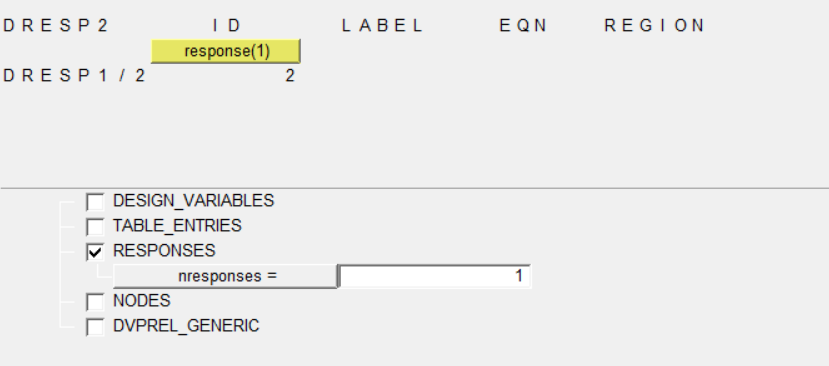
optistruct中的DRESP2响应设置
1.先编写自己的函数公式 函数名后面的括号中要有式中包含的变量 2.定义响应,类型选择为function,dequation选择刚才设置的函数 点击edit,输入函数表达式中变量对应的响应个数,并分别选择对应哪个响应 返回,点击create,创建成功...
问答精选
data transform of column by group into new columns in R
data as displayed output I can do it in a slow way of 1) creating NA for all new variables; 2) fill it on condition if(Type=="A"){ Var1_A <- Var1 } else if(..)} But I was wondering if the...
Perl simple one-liner used to add header to a file doesn't work when input file is empty
We have in code one-liner used to add header to file. It looks like perl -pi -e 'print "name, function, group\n" if $. == 1' CSV_FILE_NAME Everything is fine except when CSV_FILE_NAME is emp...
Integrating Google Sign-In into Your Android App Error
I'm just trying this link but I'm stuck in "Add the Google Services plugin" step... I just added the dependency they said but Android Studio' console is showing me this error: Could not find...
Best way to delete large no of random rows in PostgreSQL
I have a table which contains about 900K rows.I want to delete about 90% of the rows. Tried using TABLESAMPLE to select them randomly but didn't get much performance improvement. Here are the queries ...
Removing the border of legend symbol
I was trying to plot some predicted vs. actual data, something that resembles the following: The plot looks like this: The only issue I have with this plot is the red border surrounding the legend ite...
相关问题
相关文章
- Linux2.6.39在S3C2440上的移植(一)添加NANDFLASH分区
- 基于S3C2440的busybox的移植 yaffs根文件系统制作
- Linux-4.9.2内核在mini2440上的移植(五)——添加yaffs文件系统
- U-boot在S3C2440上的移植详解(二)
- tiny6410的yaffs2文件系统的制作及其安装(2)
- UBOOT-2010-03在S3C2440上的移植<二>------------硬件初始化
- tiny6410的yaffs2文件系统的制作及其安装(1)
- UBOOT-2010-03在S3C2440上的移植<四>------------支持NANDFLASH
- UBOOT-2010-03在S3C2440上的移植<一>------------项目搭建
- U-boot在S3C2440上的移植详解(三)
热门文章
推荐文章
相关标签
推荐问答
- How to compile a jocaml file with ocamlbuild and include a package?
- Is neo4j compatible with websockets out-of-the-box?
- How do I fix my output regarding my switch statement?
- GitLab search and graph fail on large repo
- Efficiency of asynchronous non-blocking server socket
- How to click a button with its value with WWW::Mechanize
- Sort array based on second array order
- iOS Facebook SDK 4.0.1 getting user's email
- Apache Ignite and Spring Data - How to delete an entity?
- Why does explicitly subclassing from object in python cause global NameError exceptions?