wpf右下角弹出自定义提示框
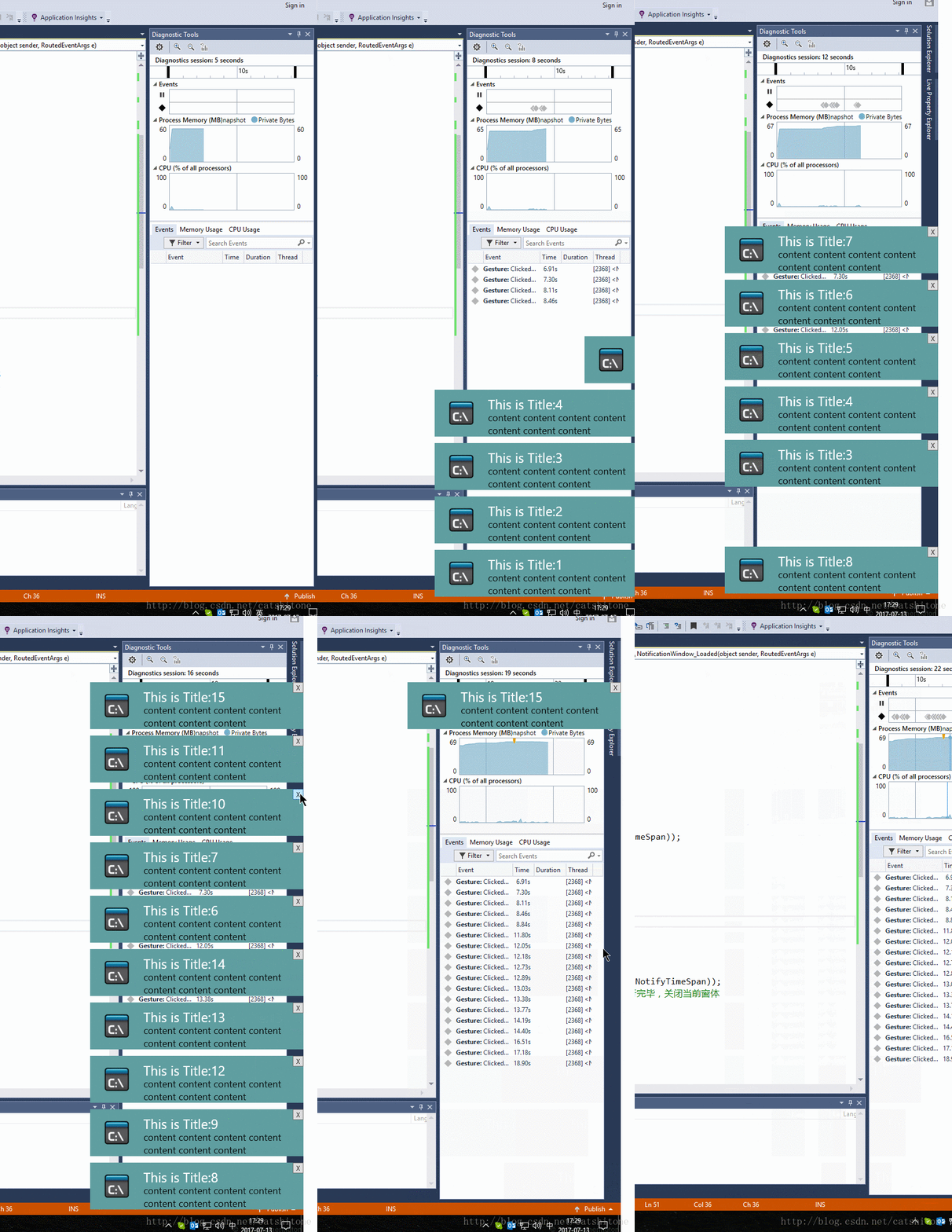
1.先看效果
2.实现
1.主界面是MainWindow
上面就只摆放一个Button即可。在Button的点击事件中需要new一个弹出的NotificationWindow。代码如下:
public static List<NotificationWindow> _dialogs = new List<NotificationWindow>();
int i = 0;
private void Button_Click(object sender, RoutedEventArgs e)
{
i++;
NotifyData data = new WpfApplication1.NotifyData();
data.Title = "This is Title:"+i;
data.Content = "content content content content content content content ";
NotificationWindow dialog = new NotificationWindow();//new 一个通知
dialog.Closed += Dialog_Closed;
dialog.TopFrom = GetTopFrom();
_dialogs.Add(dialog);
dialog.DataContext = data;//设置通知里要显示的数据
dialog.Show();
}
private void Dialog_Closed(object sender, EventArgs e)
{
var closedDialog = sender as NotificationWindow;
_dialogs.Remove(closedDialog);
}
其中NotifyData类只有两个属性分别是Title和Content,给NotificationWindow提供所要展示的消息数据。
GetTopFrom方法用来获取弹出通知框的底部应该在WorkArea(工作区)的哪个位置:
double GetTopFrom()
{
//屏幕的高度-底部TaskBar的高度。
double topFrom = System.Windows.SystemParameters.WorkArea.Bottom - 10;
bool isContinueFind = _dialogs.Any(o => o.TopFrom == topFrom);
while (isContinueFind)
{
topFrom = topFrom - 100;//此处100是NotifyWindow的高
isContinueFind = _dialogs.Any(o => o.TopFrom == topFrom);
}
if (topFrom <= 0)
topFrom = System.Windows.SystemParameters.WorkArea.Bottom - 10;
return topFrom;
}
2.弹出的通知是一个NotificationWindow
这个Window就一个Image,一个Button,两个TextBlock。
就长这个样子:
Image用来显示通知的图标,Button用来关闭当前window,两个TextBlock的Text属性分别banding到NotifyData类的Title和Content属性上,用来显示消息的标题和正文。
在NotificationWindow中添加如下代码:
public double TopFrom{get; set;}
private void NotificationWindow_Loaded(object sender, RoutedEventArgs e)
{
NotificationWindow self = sender as NotificationWindow;
if (self != null)
{
self.UpdateLayout();
SystemSounds.Asterisk.Play();//播放提示声
double right = System.Windows.SystemParameters.WorkArea.Right;//工作区最右边的值
self.Top = self.TopFrom - self.ActualHeight;
DoubleAnimation animation = new DoubleAnimation();
animation.Duration = new Duration(TimeSpan.FromMilliseconds(NotifyTimeSpan));//NotifyTimeSpan是自己定义的一个int型变量,用来设置动画的持续时间
animation.From = right;
animation.To = right - self.ActualWidth;//设定通知从右往左弹出
self.BeginAnimation(Window.LeftProperty, animation);//设定动画应用于窗体的Left属性
Task.Factory.StartNew(delegate
{
int seconds = 5;//通知持续5s后消失
System.Threading.Thread.Sleep(TimeSpan.FromSeconds(seconds));
//Invoke到主进程中去执行
Invoke(self, delegate
{
animation = new DoubleAnimation();
animation.Duration = new Duration(TimeSpan.FromMilliseconds(NotifyTimeSpan));
animation.Completed += (s, a) => { self.Close(); };//动画执行完毕,关闭当前窗体
animation.From = right - self.ActualWidth;
animation.To = right;//通知从左往右收回
self.BeginAnimation(Window.LeftProperty, animation);
});
});
}
}
static void Invoke(Window win, Action a)
{
win.Dispatcher.Invoke(a);
}
上面这段代码注释已经很明白了,没什么好讲的。
当Button按钮点击后执行关闭窗体操作,这段代码其实跟上面的类似:
private void ButtonClose_Click(object sender, RoutedEventArgs e)
{
double right = System.Windows.SystemParameters.WorkArea.Right;
DoubleAnimation animation = new DoubleAnimation();
animation.Duration = new Duration(TimeSpan.FromMilliseconds(NotifyTimeSpan));
animation.Completed += (s, a) => { this.Close(); };
animation.From = right - this.ActualWidth;
animation.To = right;
this.BeginAnimation(Window.LeftProperty, animation);
}
3.结束了,就这么简单
CSDN下载
百度免费下载:链接: https://pan.baidu.com/s/1eSq5f8Y 密码: 5sna
来源:网络
智能推荐

android 自定义提示框、对话框、加载框
项目实现项目地址: https://github.com/fingerth/FingerthAndroidUtils 点击使用方法 使用方法 Step 1. Add the JitPack repository to your build file Add it in your root build.gradle at the end of repositories: allprojects { ...

自定义弹出框
// // WJViewController.m // WJAlertView // // Created by 华通众和 on 16/5/5. // Copyright 2016年 华鑫志和科技. All rights reserved. // #import "WJViewController.h" #import "...
快速上手团队开发项目中的Git版本管理
快速上手团队开发项目中的Git版本管理 文章目录 快速上手团队开发项目中的Git版本管理 前言 一、git是什么? 二、使用步骤 1.IDEA引入Git 2.Git中的分支含义 3.Git中的使用操作 前言 目前团队项目开发中一般都会使用Git,但新人初入团队项目,对Git操作难免会有些不熟悉,常常会分不清 各个分支的作用和代码合并的问题,所以如何快速的介绍Git的项目分支和使用操作需要进行一些梳...
idea怎么设置成中文
idea怎么设置成中文 IDEA怎么使用集成汉化插件 打开 File —>Settings —> Plugins 或Ctrl + Alt + S 打开 Settings —> Plugins ,直接看图把! 安装完成之后,到 lnstlled 把Chinese勾上 点击OK,重启后就有中文效果了。 中文效果 关闭中文效果,到 lnstlled ...
前端上传大型文件或超长数据的解决办法
核心原理: 该项目核心就是文件分块上传。前后端要高度配合,需要双方约定好一些数据,才能完成大文件分块,我们在项目中要重点解决的以下问题。 * 如何分片; * 如何合成一个文件; * 中断了从哪个分片开始。 如何分,利用强大的js库,来减轻我们的工作,市场上已经能有关于大文件分块的轮子,虽然程序员的天性曾迫使我重新造轮子。但是因为时间的关系还有工作的关系,...
猜你喜欢
Deformable Convolutional Networks(可变形卷积)
https://github.com/lixiaolei1982/Deformable-ConvNets 一,《Deformable Convolutional Networks》是一篇2017年Microsoft Research Asia的研究。基本思想也是卷积核的采样方式是可以通过学习得到的。作者提出了两种新的op:deformable convolution和deformable roi ...
【转】《与MySQL的零距离接触》第九章:MySQL存储引擎 (9-6:MySQL 各个存储引擎特点)
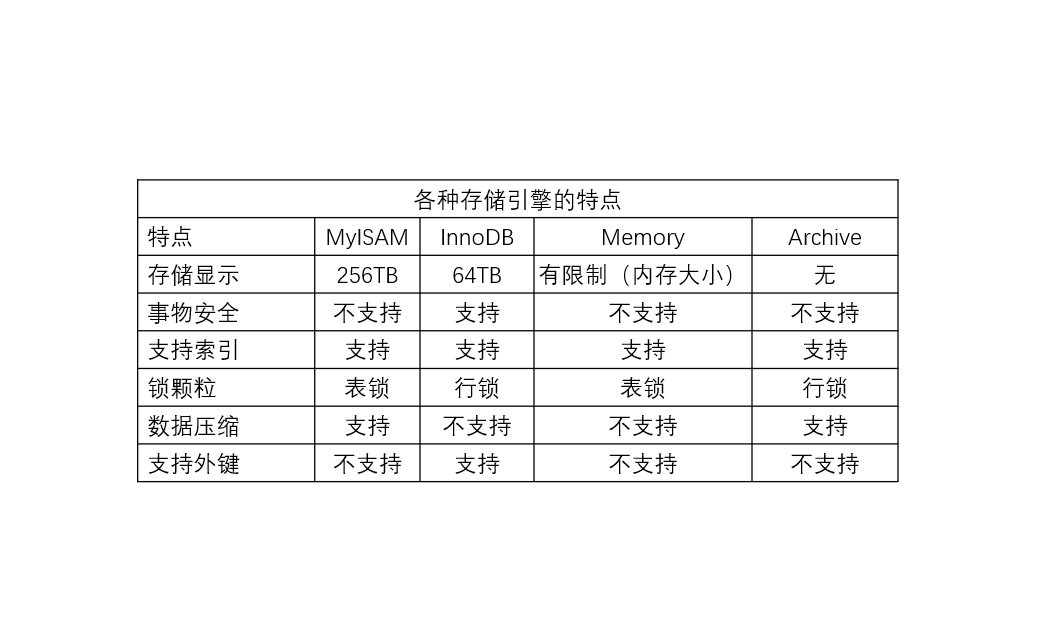
转载出处: 慕课网:《与MySQL的零距离接触》笔记目录https://zhangjia.tv/682.html 9-6:MySQL 各个存储引擎特点 各种存储引擎的特点如下图: 另外还有CSV存储引擎:由逗号分隔的存储引擎,会在数据库的子目录里为每一个表创建一个csv的文件,每一个数据行占用一个文本行,CSV的存储引擎不支持索引 BlackHole:黑洞引擎,写入的数据都会消失,一般用于做数据复...
Dubbo接口测试调试工具(三) -- 项目设计
聊的不止技术。跟着小帅写代码,还原和技术大牛一对一真实对话,剖析真实项目筑成的一砖一瓦,了解最新最及时的资讯信息,还可以学到日常撩妹小技巧哦,让我们开始探索主人公小帅的职场生涯吧! (PS:本系列文章以幽默风趣风格为主,较真侠和学习怪请绕道~) 江华:“哟,小帅,又在写bug啊?” 小帅:“滚......&...

#完美解决 闪讯客户NetKeeper---Sorry,this application cannot under a Virtual Machine
完美解决 因为win10自带虚拟软件Hyper-V关闭不完全导致的无法打开闪讯客户端Netkeeper 适用于 Windows 10 系统(非虚拟机环境)下的 Net Keeper 误报虚拟机问题: (Sorry,this application cannot under a Virtual Machine) 茫茫网海搜索的无助,俺来也 问题描述: 由于使用过win10自带的Hyper-V,导致无...
Extjs Form布局
from:http://blog.sina.com.cn/s/blog_7045cb9e0100t6f5.html FormPanel 有两种布局:form和column,form是纵向布局,column为横向布局。默认为后者。使用layout属 性定义布局类型。对于一个复杂的布局表单,最重要的是正确分割,分割结果直接决定布局能否顺利实现。 如果不再使用默认布局,那么我们必须为每一个元素指定一种布...
问答精选
count and group by two tables in mysql
I have two database tables and i want to order my posts by votes, i tried the query method below but it is not working as i wanted. my tables are like this : I want query like this ( postvotes has Pos...
Incorperate iAnnotate into my iPad App
So I was surfing the web on my iPad and I saw a link to a PDF that I wanted to view. I clicked the link, the PDF downloaded and opened. The first thing I noticed while viewing the PDF is a button I co...
How to interpret objective-c type specifier (e.g. returned by method_copyReturnType())?
Given I have a type specifier as returned by method_copyReturnType(). In the GNU runtime delivered with the GCC there are various methods to work with such a type specifier like objc_sizeof_type(), ob...
How to create a dynamic array of an Abstract class?
Lets say I have an abstract class Cat that has a few concrete subclasses Wildcat, Housecat, etc. I want my array to be able to store pointers to a type of cat without knowing which kind it really is. ...
select text inside an html element and change style
I need to select text1 only and put some styling.. I tried but both text1, and text2 become red. I'm searching for something like. Thank you Wrap text1 in a <div> or <span> tag with some i...
相关问题
相关文章
热门文章
推荐文章
相关标签
推荐问答
- android:ListSelector doesn't work on my ListView
- How can I access a Range inside a filtered list to retrieve the values? VBA
- how to integrate multiple jenkins pipelines's work
- Identify USB flash drive in C#
- GO html/template: test equality of two dot variables
- Python: how to run a command while using a defined variable?
- Pandas boolean indexing error with .drop()
- Get FIle extension using Android Storage Access Framework
- Multiple paragraphs next to Font-Awesome icon and vertically-centered
- Eonasdan Bootstrap Linked DateTime Pickers not working as expected